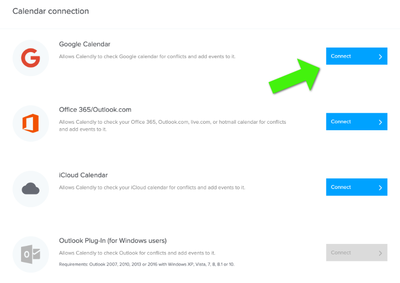
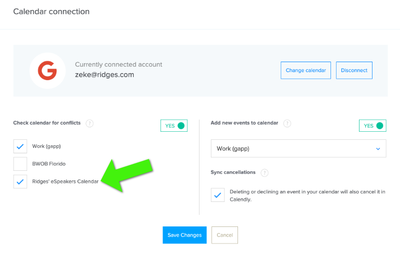
PRESENTERS Calendly.com provides a service that allows easier scheduling of phone calls or other short appointments. When allowing others to schedule appointments with you, Calendly can check your calendar for availability, and certainly your speaking calendar should be included in that check. These instructions explain how to make sure that Calendly users don’t make appointments with you that conflict with your speaking or travel schedule. eSpeakers is not qualified to provide customer support for any Calendly-related questions. The Calendly team is available here . To use Calendly with your EventCX speaking calendar:
Link Your eSpeakers Calendar to Your Cloud Calendar #
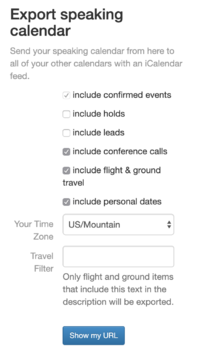
If you’ve already exported your EventCX speaking calendar so that it shows in your cloud calendar account, you can skip this step. Using the iCalendar Feed from EventCX, link your EventCX calendar to one of the cloud calendars that Calendly supports (currently Google, Outlook, and iCloud). This help article uses Google Calendar for an example, but the workflow is similar with any of the others.
Generate Your EventCX iCalendar Feed URL #
Following these instructions generate an iCalendar export URL with these settings: Make it include:
- Confirmed events
- Personal dates
- Conference calls
- Travel
Import This URL Into Your Cloud Calendar #
With your iCalendar export configured as above, follow these instructions to import the provided URL into your cloud calendar.
Connect Calendly to Your Cloud Calendar #
In Calendly’s settings, choose the provider of the same cloud calendar that you linked to your EventCX calendar in the previous step.