
Next to video, recommendations are the most persuasive information you can provide to meeting planners who are considering hiring you. And a *verified* recommendation is the way to go — it’s an endorsement the buyer trusts. Purchasing based on trusted reviews is now expected because of sites like Amazon, eBay, Zappos, and other retail sites. Meeting planners research speakers the same way; they want to know what others have said about you before they decide to hire you. However, online recommendations are difficult for meeting planners to trust. With Verified Recommendations you can help potential customers have confidence in your in your recommendations because they come from trusted sources.
Verify Your Recommendations #
Verifying your recommendations is simple.
- Enter the [
Profile & Marketing area
] of your eSpeakers account. - Click into the VIDEOS, FILES AND RECOMMENDATIONS area. Use the right side of this screen to load your RECOMMENDATIONS.
- After completing the recommendation data entry, you will be asked to VERIFY THIS RECOMMENDATION … enter the client’s email address here. Click the VERIFY button.
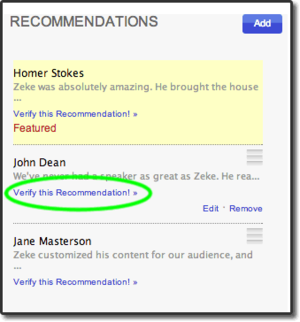
- TIP: If possible, use a corporate domain email address (like @ibm.com) and not a generic address (like @gmail.com) because corporate domains lend credibility. Only the domain name will be shown on the review; your customer’s full email address will never be displayed anywhere.
- Repeat steps 3 & 4 for as many recommendations as you can.
What Happens After You Enter the Recommender’s Email Address? #
When you verify one of your recommendations, we send the customer who made the recommendation an email that looks like this.
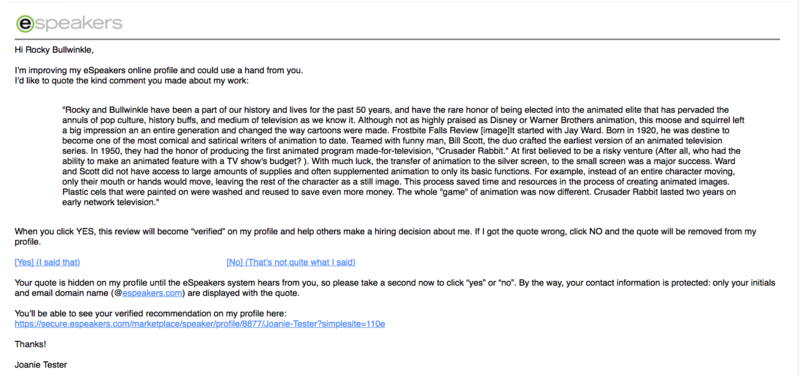 It comes from eSpeakers, shows the quote, and asks them to agree they said it. They click yes or no right in the email. If they click no, they have the chance to tell you why they did so and that is emailed back to you. The email also contains a link to your eSpeakers profile, allowing the recommender to remember how much they loved you (and would love you again!).
You’ll be able to see your verified review progress on the recommendations list; it will show ‘verified’ once the buyer has confirmed the quote.
On your published profile, the review is identified so that shoppers can see see the third-party validation.
It comes from eSpeakers, shows the quote, and asks them to agree they said it. They click yes or no right in the email. If they click no, they have the chance to tell you why they did so and that is emailed back to you. The email also contains a link to your eSpeakers profile, allowing the recommender to remember how much they loved you (and would love you again!).
You’ll be able to see your verified review progress on the recommendations list; it will show ‘verified’ once the buyer has confirmed the quote.
On your published profile, the review is identified so that shoppers can see see the third-party validation.

Questions? #
- What if I don’t want to verify a review (or any reviews)?
- Your unverified reviews will continue to be displayed on your profile just as they are now. No problem.
- I wish you could copy my recommendations from LinkedIn.
- What eSpeakers account level do I need?
- Recommendations are available to PRO level users.
What are you waiting for? Start boosting your online credibility with eSpeakers Verified Reviews! Want more exposure? The features described above require a PRO account. If you’re at the Basic level, consider the benefits of a PRO account. Here is the Difference Between eSpeakers Basic and PRO Accounts .


