
PRESENTER
 Google Contacts is a simple address book that is popular because of its price (free), and its compatibility with lots of mobile devices and third-party tools.
If you keep your contacts in Google Contacts, you can easily link them to your eSpeakers events. This feature is included with your PRO account (
upgrade
).
Google Contacts is a simple address book that is popular because of its price (free), and its compatibility with lots of mobile devices and third-party tools.
If you keep your contacts in Google Contacts, you can easily link them to your eSpeakers events. This feature is included with your PRO account (
upgrade
).
Configuring Google Contacts Connector #
- In the eSpeakers application, use the CONNECT menu and choose GOOGLE CONTACTS CONNECTOR SETTINGS
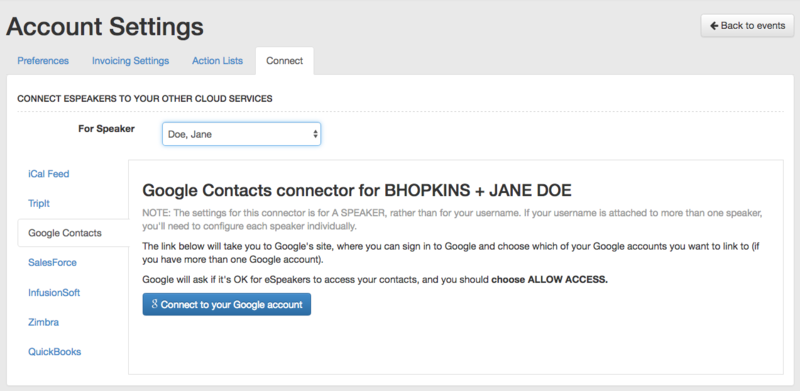
- ACTIVATE the booster if needed to arrive at the booster settings screen for the Google Contacts Connector. Click the SIGN INTO MY GOOGLE ACCOUNT link.
- The next screen is presented by Google and is confirming that you want to give your eSpeakers account access to your Google Contacts account. Click ACCEPT.
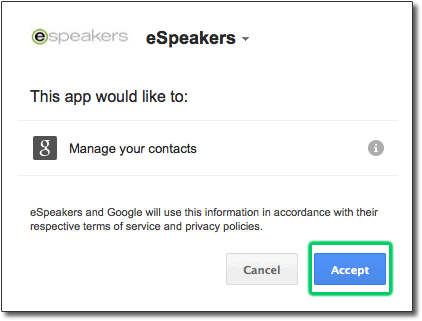
That’s it! Just quit and restart the eSpeakers application to make the booster effective.
Linking Google Contacts to eSpeakers Events #
- In the eSpeakers app, use the CONTACTS tab on the event you want to link contacts to.
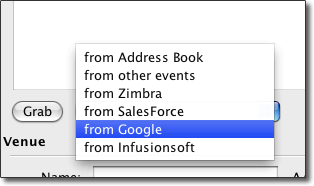
- From the dropdown list next to the GRAB button, choose GOOGLE. Then click the GRAB button.
- Enter part or all of the name of the contact you want to be added to this event, then click the search button (MAGNIFYING GLASS).
- Choose the name you want from the list of the results and click the GRAB button.
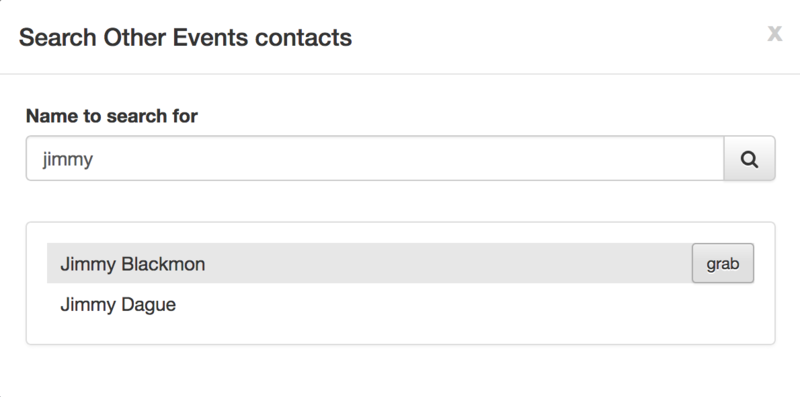
Presto! You now have a copy of that Google Contact added to the event. Note that grabbed contacts are copies; you can make changes to their record on the eSpeakers event and it will not affect the original contact in Google Contacts. Likewise, changes you make in Google Contacts will not change copies of those contacts previously added to an event.


