
Having a profile up in the eSpeakers Marketplace is a good way to get exposure to buyers. Your programs are a critical part of your profile: it’s what the buyers are getting when they hire you. They also include searchable information that isn’t stored anywhere else in your profile, so having great program information will mean you are included in additional searches.
Add Your Programs to Your Profile #
Follow these steps to add programs to your profile:
Sign in
to your eSpeakers account and edit your profile.- On the MY PROFILE screen, choose PROGRAMS from the choices on the left.
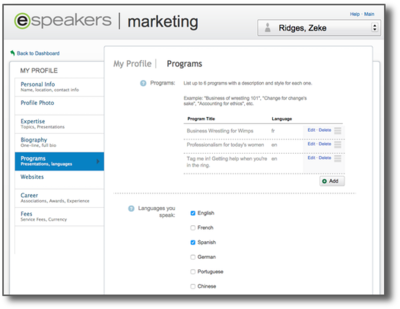
- Click the ADD button to add a new program
- Choose the language, specific topic (if any), and type of presentation.
If you present this program in more than one language, add it multiple times: once for each language. - Enter the program’s title (e.g. “Make every day a great hair day”)
- On the left, we have a template. This includes:
FORMAT
: The time your programs will take
TARGET AUDIENCE
: Who are you looking to speak to
TAKEAWAYS
: What will help the audience gain by hearing this keynote
- Describe your program’s characteristics by choosing tags from the available tag groups.
- click a tag group at left (“program style”, “CMP Domain”, etc) then select applicable tags at the right.
- in the displayed list of selected tags, drag and drop to arrange in order of importance, with most important first.
These program tags are searchable by buyers, so be sure to tag accurately so that you are included in searches. - Adding a
CMP Domain tag
is a good way to get hired by MPI chapters.
- Enter the program’s description in the area provided. This generally a few sentences long.
The
PROGRAM DESCRIPTION
field should begin (or include at some point) the benefits the audience will receive. Explain how the audience members will be improved or changed due to what you will offer in the presentation. One successful pattern is to use a bullet list labeled “This program is perfect for:” followed by 3 or 4 items like “Managers struggling with dysfunctional teams,” “Organizations going through change,” “Sales teams who want to improve conversion rates,” etc.
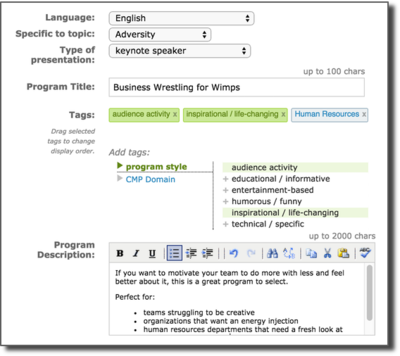
- Click the APPLY button to commit your changes.
Add a few programs to your profile right now, and make it easy for buyers to hire you. NEXT STEP Once you’ve finished these steps, you’re ready to really crank up the sales potential of your profile by adding client recommendations, streaming video and audio, one-sheets, and more .


