PRESENTER eSpeakers EventCX event calendar can grab contacts from your Salesforce account, making it easy to use the two together: Salesforce to manage contacts and EventCX to manage events. All you need is an eSpeakers PRO level account and a Salesforce account. For your Salesforce account to have interaction with any third-party application (like eSpeakers), you must have the Salesforce API activated on your account. To use the API, your organization must be using one of the following Salesforce editions:
- Enterprise Edition
- Unlimited Edition
- Developer Edition
- Performance Edition
- Professional Edition (requires purchase of API access from Salesforce)
Salesforce Editions that cannot access any third party tools (including eSpeakers):
- Contact Edition
- Group Edition
Additional information at the Salesforce site » .
Connect to Your Salesforce Account #
You’ll need three things from your Salesforce account:
- Your Salesforce login (usually your email address)
- Your Salesforce password
- Your Salesforce API token
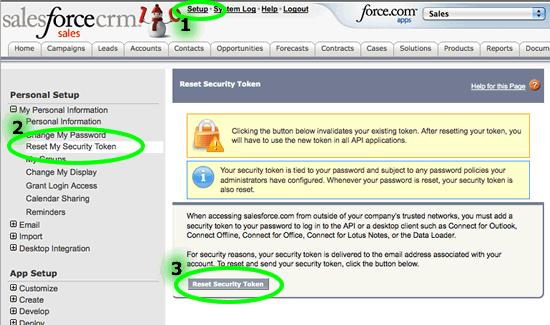
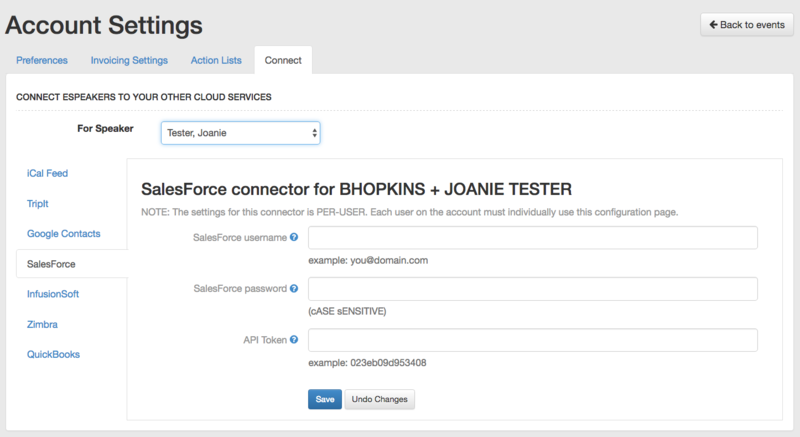
You can get your Salesforce API token (also called a security token) inside Salesforce starting at the SETUP link. Once you have these three things from your Salesforce account, login .
- Choose username dropdown in upper right corner. Select SETTINGS, then CONNECT tab.
- Complete the Salesforce information.
All done with setup!
Link Salesforce Contacts to Events in eSpeakers #
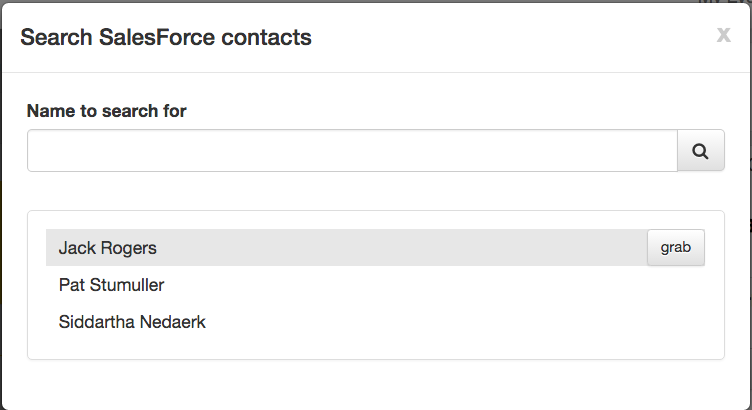
Once setup is complete, you can “grab” contacts from Salesforce in the exact same way you grab from other sources. On the contacts tab, click the GRAB button and enter a name to search for. Select a name from the results to attach a copy to the event.