
There are many documents to generate for events during the different phases of their lifetime. Examples include:
- Thank-you for holding the date
- Confirm release of the date
- Confirm the date
- Contract
- Pre-event Questionnaire
- …many more
eSpeakers can quickly generate these for any event on your calendar by filling the event’s details into a template document. The template document is easy to prepare using Word or Excel and these instructions.
How Do I Generate Contracts and Other Documents Using Templates? #
It’s easy to generate contracts, invoices, thank-you notes…any type of document you use Word or Excel to create.
- Sign in to your eSpeakers calendar.
- Select the event for which you want to generate a document.
- Click the LIBRARY tab.
- In the TEMPLATE LIBRARY list, find the template for the type of document you’d like to create.
(If you need to prepare a new template, follow these instructions and then return to the next step.)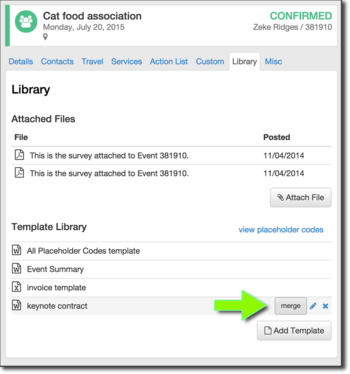
- Click the MERGE button for the template you’d like to use.
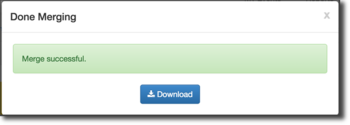
- Wait a few moments while your document is being prepared. The eSpeakers system is filling in all of the placeholder codes in the template document with data from the event. When it’s ready, click the DOWNLOAD button to retrieve your document.
- The document is a complete Word or Excel file, ready to print, save, email, etc. You can also make any changes you like to it after it’s been generated.


