
Your Marketplace-powered directory can give your customers a full-featured experience with sign-in, saved shortlists, and more. But sometimes, you want to keep it simple. The Marketplace directory offers two ways to operate: the default “shortlists” mode, and a “simple” mode.
Simple Mode #
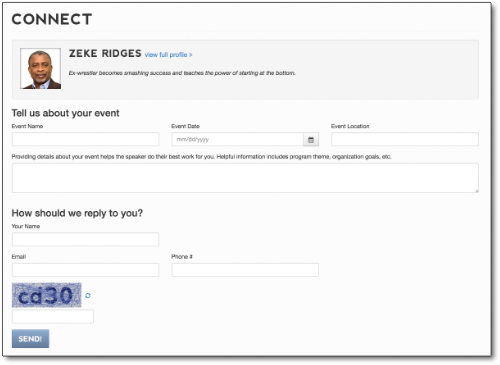
When your directory is in Simple mode, buyers never create an account on the site or create shortlists. Buyers fill out a short contact form when the want to inquire about a speaker, and that inquiry is sent to the staff at your organization via email. That email is the only record of the request; there’s no reason for buyers or your staff to log in anywhere. Once you get the email you handle it however you handle the other leads in your office.
If a speakers directory is new to your organization, of if your old directory did not support shortlists…Simple mode may be a good fit for you.
Shortlist Mode #

In Shortlist mode, which is the default setting for new accounts, buyers create shortlists (like a shopping cart of speaker candidates) and can interact with your staff around that shortlist. Buyers get an account on your directory and can come back later, sign in, and access and update their shortlists as they narrow down their selection.
The staff at your organization have access to all of your customer’s shortlists, and you can guide their selection process by adding and removing speakers from their shortlists as a part of your conversation with them about their event.
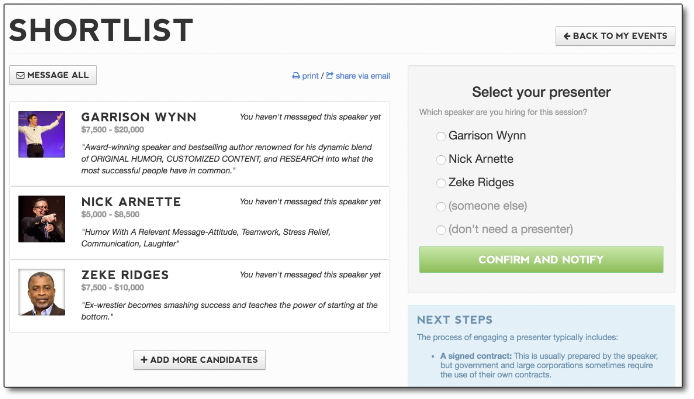
Your staff is immediately notified via email about new shortlist that have been created. Staff can sign in to see and work with any customer shortlist.
How do I switch directory modes? #
Switching directory modes is a substantial choice, but easy to execute: just send us a note requesting a mode change. Make sure the email comes from the email address associated with an administrator user on your eSpeakers account.


