
Helping out an event organizer is easy! Most of the time your referral will be complete in less than 2 minutes. You need to:
- Know an event organizer/meeting planner (name, email, and phone number)
- Know a little about an event for which they need a speaker (event or meeting name, general subject of the speaking slot)
- Be
registered as a Sharer
(it’s free)
Make sure your event organizer wants suggestions for speakers and is expecting to get an email with your recommendations. This is important — SpeakerShare may not be used to “spam” unsuspecting meeting planners. Ready? Here’s how to do it:
Fill Out the Referral Form #
- Use your web browser to go to the
referral form »
, signing in first if needed
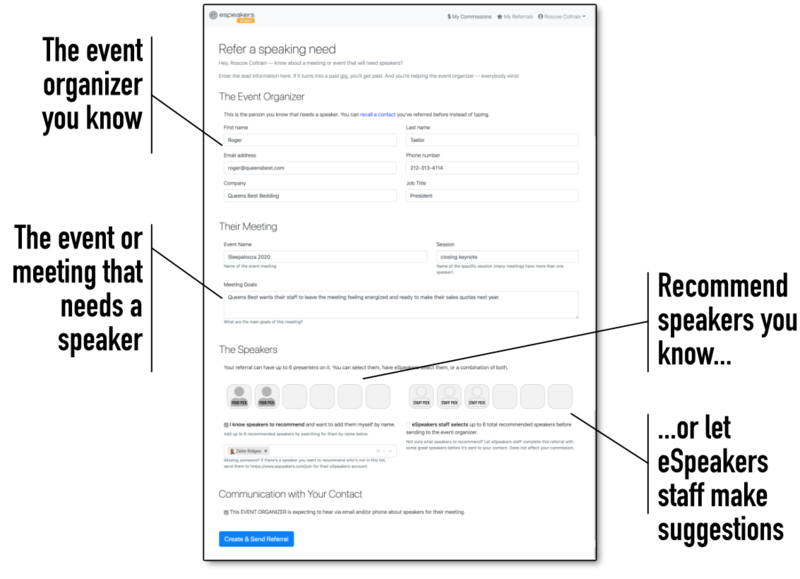
- Complete THE EVENT ORGANIZER section
- First name
- Last name
- Email address
- Phone number
- Company
- Job title
It’s fine to use an approximate job title
- Complete THEIR MEETING section
- Event name
ie, “Honda Dealer Meeting 2020”, “ICCA World Congress”
- Session
ie, “opening keynote”, “breakout session”, “lunch entertainment”
- Meeting goals
Enter as much as you know about the outcome they’d like from their presenter. This is especially important if you’re going to have eSpeakers staff select speakers.
- Event name
- Add THE SPEAKERS
- I know speakers to recommend
Use this box when you already know the names of 1 or more speakers you know would do a great job. After checking the box, type the name into the box below and when the speaker you’re looking for comes up in the list, click to add. You can add up to 6 speakers this way, but you only need 1.
- eSpeakers staff selects
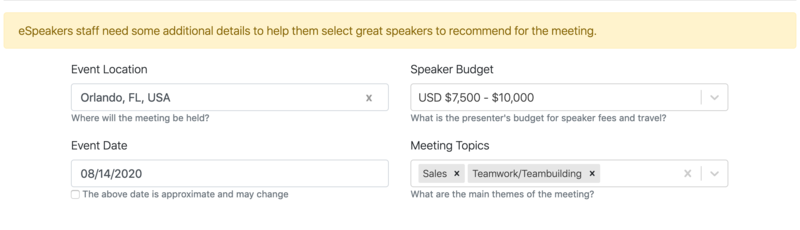
Use this box to have eSpeakers’ expert staff use their contacts in the industry to add a few great candidates to the referral before it goes out to the event organizer. If you use this service, a few more questions about the event will appear. The information is used by eSpeakers staff to help them find available speakers who will be a great fit for the meeting goals and budget. It’s fine to use BOTH of these options. Add a couple of speakers you know, and if you’d like more, also check the “staff adds” box.
- I know speakers to recommend
- COMMUNICATION WITH YOUR CONTACT
- Check the box to confirm that the contact is someone you know, and that they are expecting to receive speaker recommendations via email. The SpeakerShare platform may not be used to spam unsuspecting meeting planners.


