
DIRECTORY PUBLISHER The Showcase Speakers setting puts you in control of promoting speakers within the search results in your directory:
- Showcase a speaker who is hot and in high demand
- A speaker has a new book being released and you want to feature them
- You’re having a conference and want to make the presenters stand out on your directory
- Showcase a speaker who has been in the news, or won an award
What Happens When I Showcase a Speaker? #

When you add a speaker to the list of those showcased, that speaker will have a special tag added to their profile.
- A showcase speaker does not appear in search results in which they wouldn’t normally be included. For instance, if “Dan” isn’t listed in the “Motivational” topic, then he won’t appear in a search for “Motivational” even though he is showcased.
- You can showcase as many speakers as you want, they will still be shown in the search results as normal.
How Do I Set or Change the Speakers Showcased on My Directory? #
To set or change the speakers showcased on your directory:
Sign in to eSpeakers
as an administrative user- In the menu that comes up, click MANAGE MY DIRECTORY
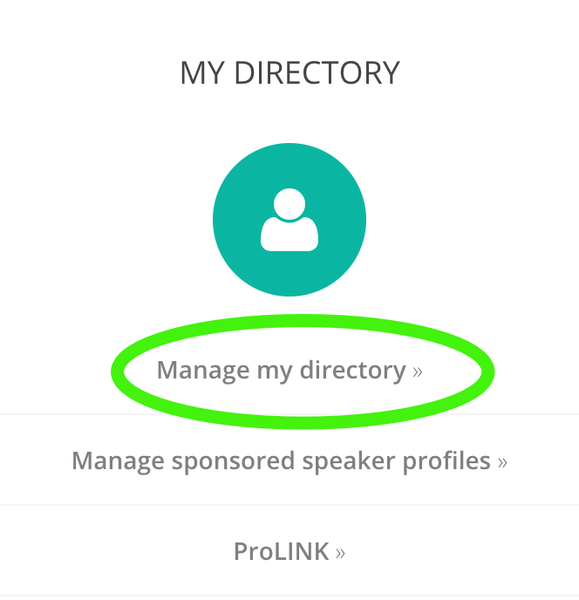
- In the MY SPEAKERS section, click SHOWCASED SPEAKERS
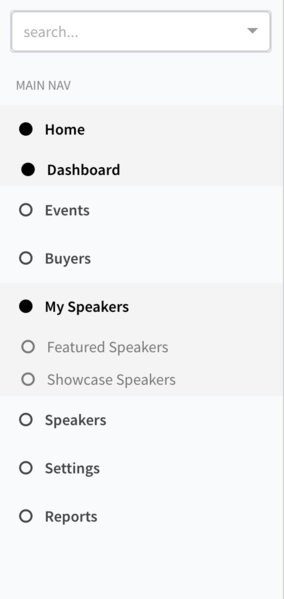
- To showcase a speaker, find them in the list and click the green “Add” button

- To remove a speaker from the showcase list, find them in the list and click on the red “Remove” button
You can change showcased speakers as often as you want.


