The Speaking Business Tech Stack: Every Tool You Actually Need in 2026
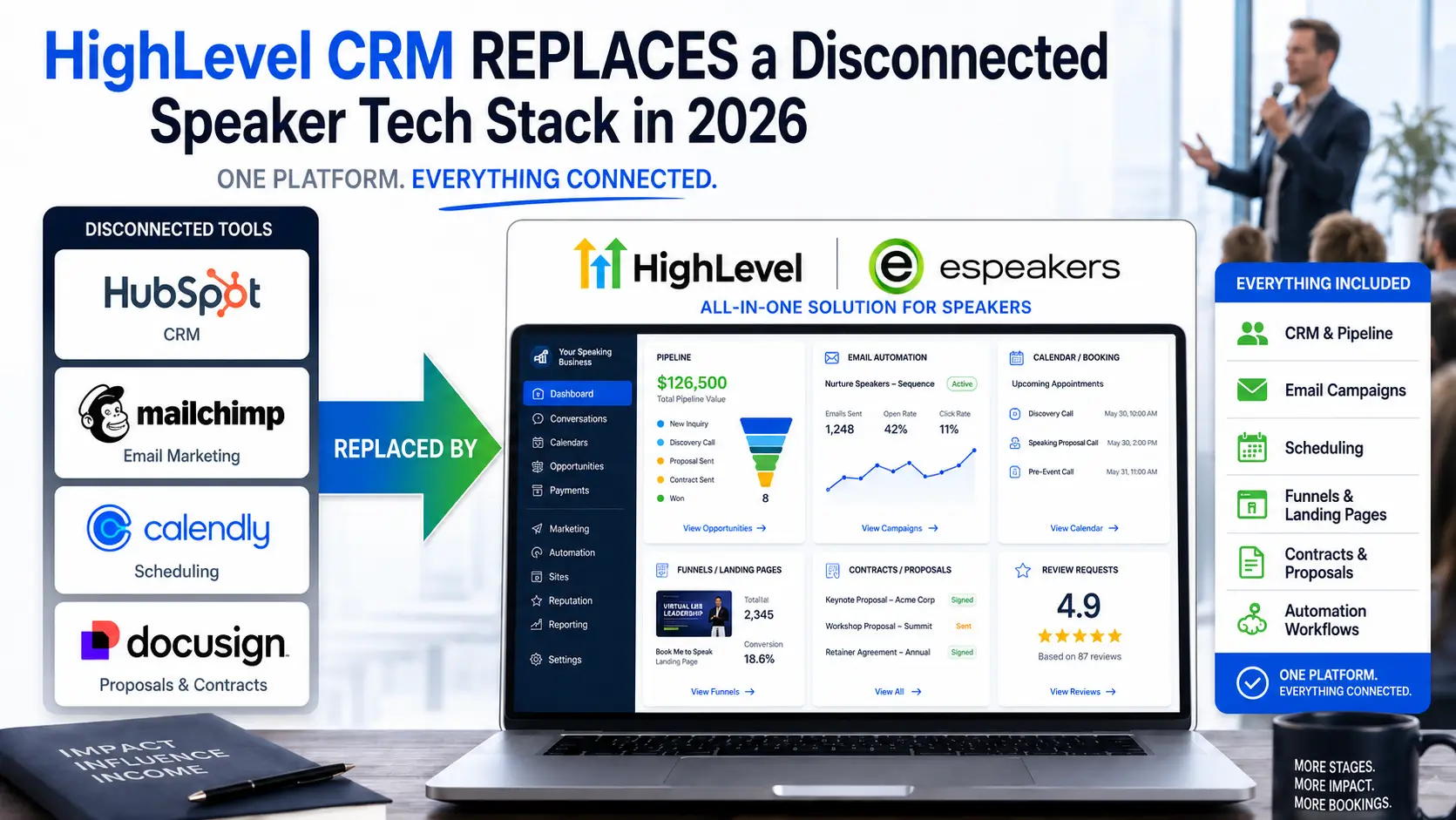
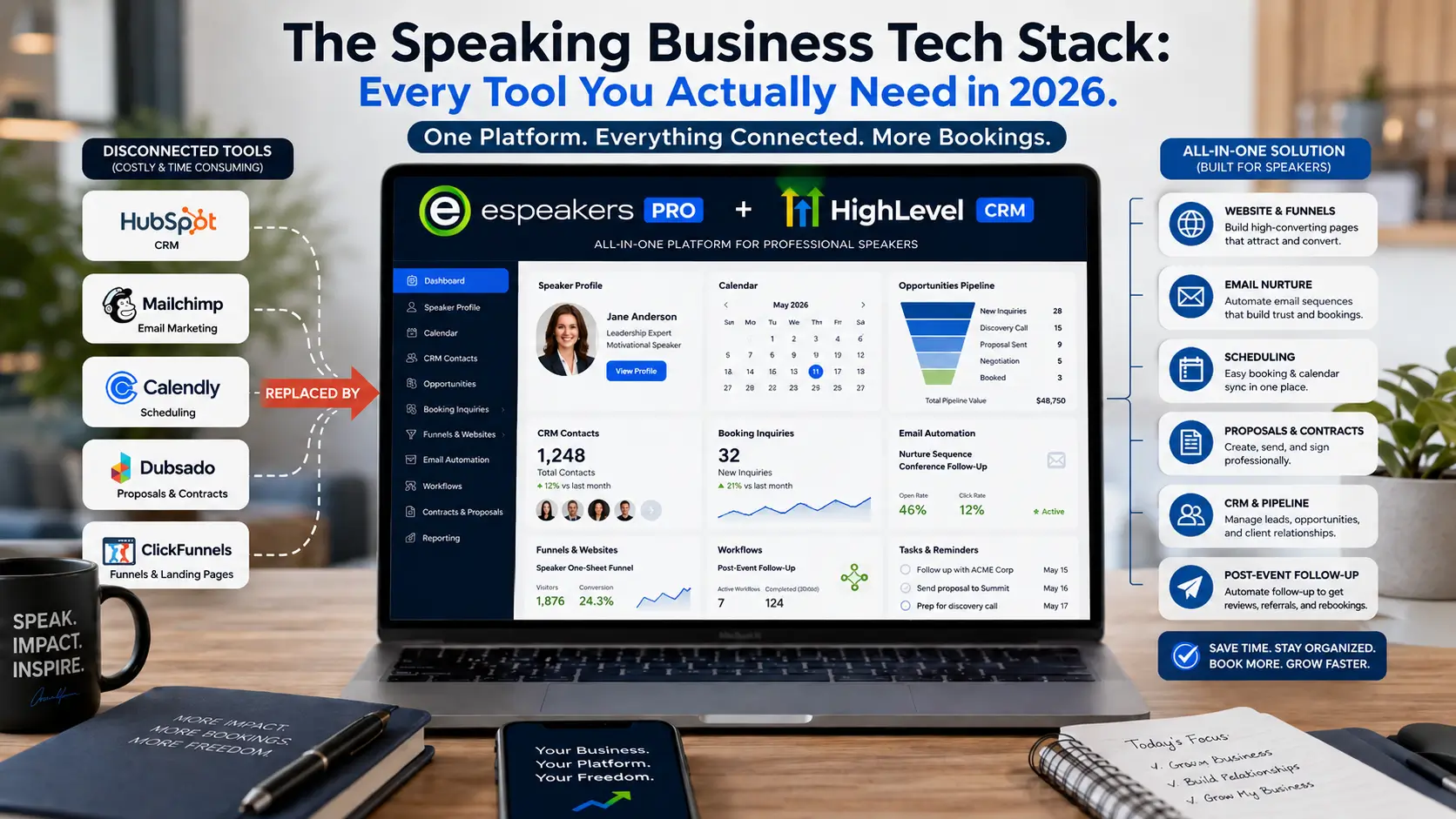
The speaking business tech stack every professional speaker needs in 2026 covers five functions: discovery (a speaker directory profile that generates inbound planner inquiries), lead capture (funnels and inquiry forms that route interest into a CRM), nurture (email marketing and automation that maintains planner relationships through long booking cycles), transaction (contracts, invoicing, and scheduling), and delivery (calendar management and event logistics). eSpeakers PRO covers all five in one platform, replacing the disconnected collection of tools, CRM, email marketing, scheduling, contracts, and funnels that most speakers currently pay $350–$500 per month to run separately.
Most professional speakers are running their businesses on too many tools that do not share data, creating failure points wherever information has to be moved between systems manually. A lead that comes through the eSpeakers profile should automatically enter a CRM pipeline, trigger a follow-up sequence, and update a calendar, with no copy-paste, no middleware to maintain, and no manual action from the speaker. That is what a properly integrated tech stack does. This article covers exactly which tools to keep, which to cut, and how to build the integration that eliminates the gaps.

John Doe
Chief Marketing Officer at eSpeakers
How to Think About Your Tech Stack
Before the tools: the framework for evaluating them.
A speaking business has five operational functions, and every tool you use serves one or more of them:
Discovery: Getting found by planners who are looking for speakers. Directory presence, SEO, social media, content, referrals.
Capture: Converting planner attention into a contact in your system. Inquiry forms, funnels, landing pages, lead magnets.
Nurture: Staying visible to planners over time until they’re ready to book. Email sequences, broadcast campaigns, social content.
Transaction: Executing the booking. Contracts, deposits, scheduling, invoicing, and payment processing.
Delivery: Running the engagement professionally. Prep call scheduling, pre-event logistics, AV coordination, and post-event follow-up.
The goal of a good tech stack is to cover all five functions while minimizing the number of platforms involved and maximizing the amount of data shared between them. A tool that requires you to manually transfer information from one system to another is a tool that creates a failure point. A tool that integrates bidirectionally with your core system is a tool that compounds value over time.
With that framework, here’s the 2026 speaker software landscape by function.
The Core Platform: eSpeakers + HighLevel CRM
Every speaker needs one system at the center of their business, the hub that everything else connects to. For professional speakers in 2026, that hub is the eSpeakers + HighLevel CRM integration.
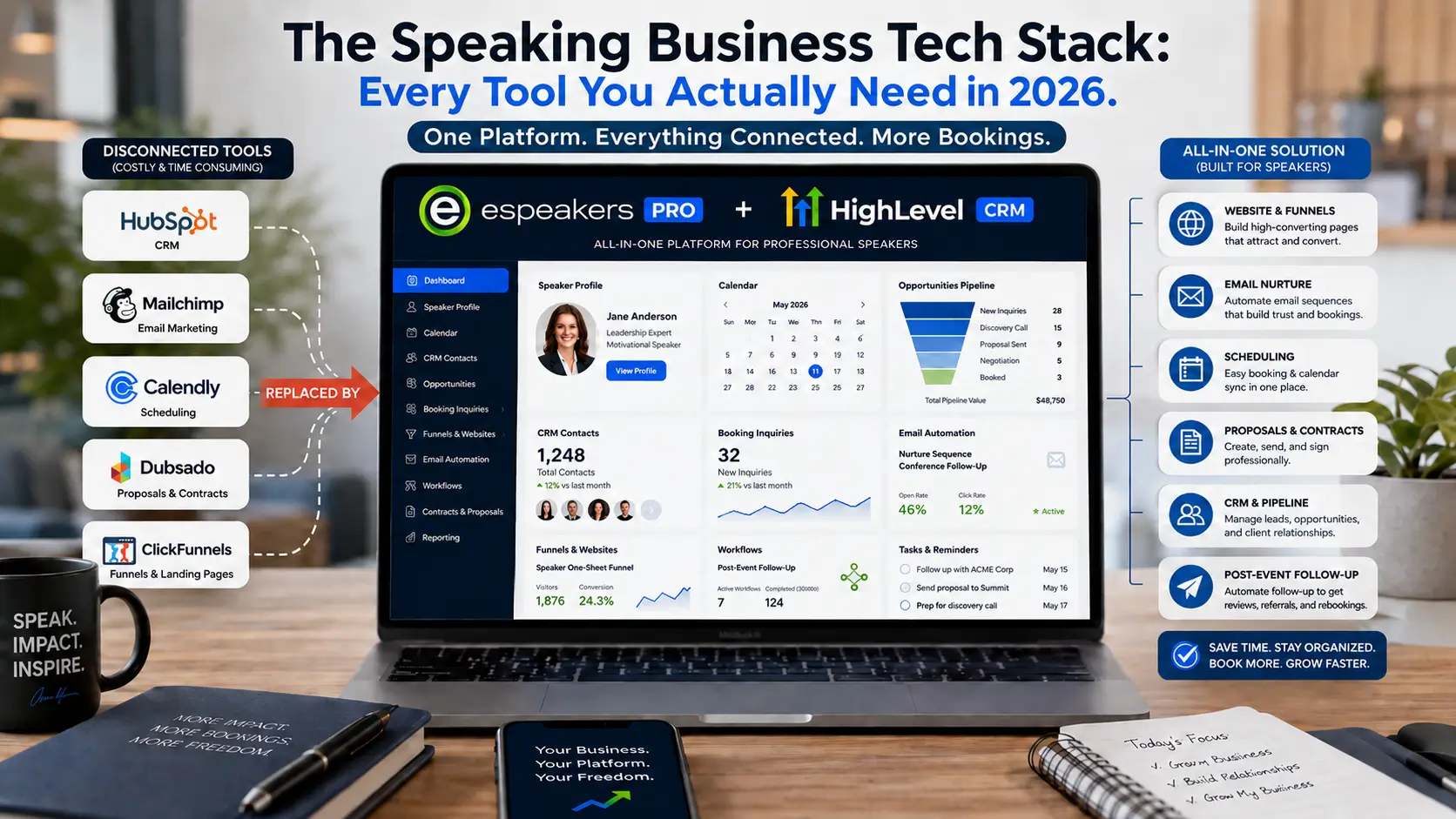
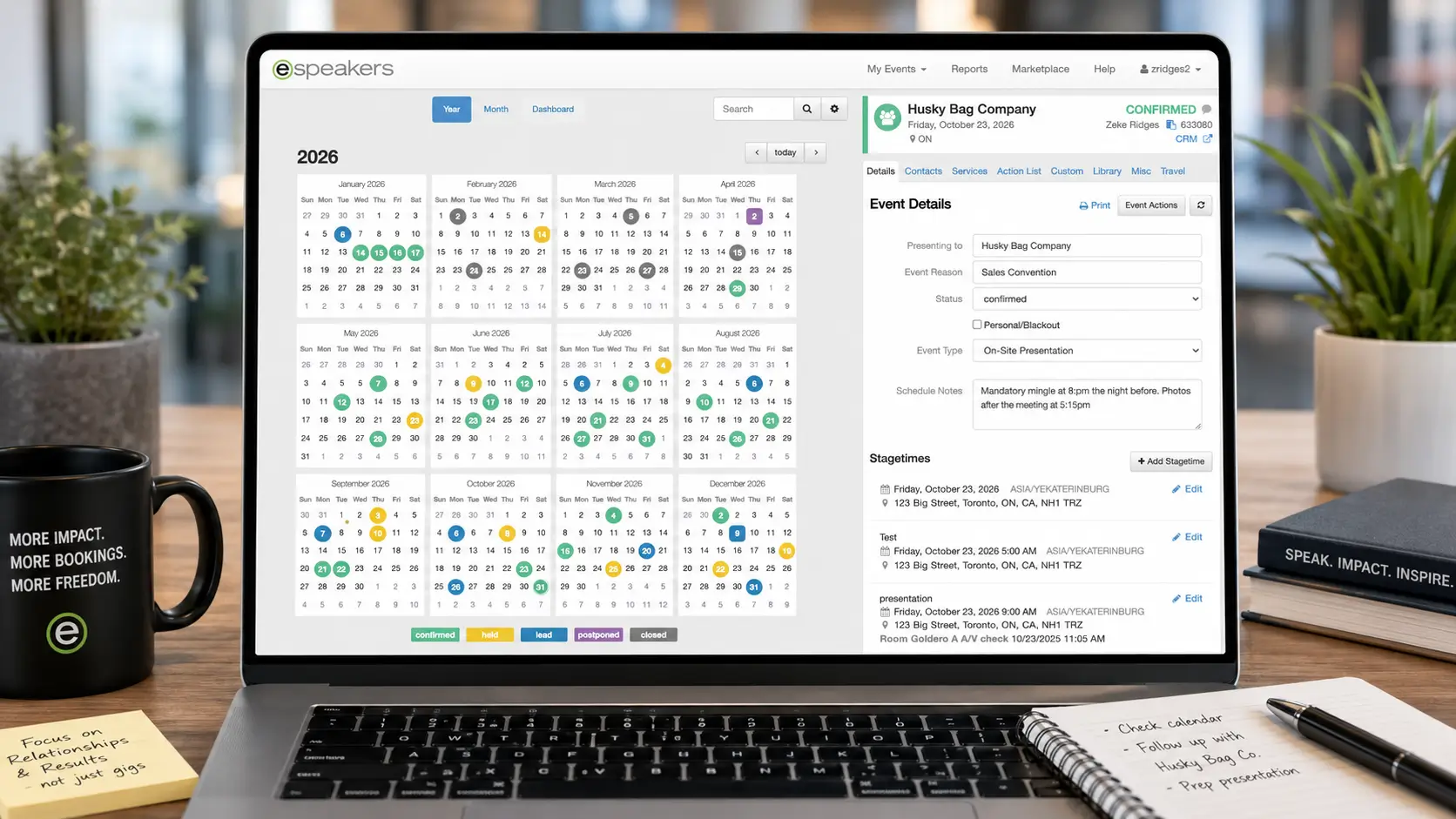
eSpeakers handles Discovery and the speaking-specific layer of Delivery: your directory presence across 80+ speaker sites, bureaus, and directories; your public-facing profile; your eSpeakers Calendar for tracking active engagements, holds, and confirmed bookings; real-time availability display for planners; and the eSEO ranking system that determines how you appear in searches.
HighLevel CRM HighLevel CRM handles Capture, Nurture, and Transaction: your contact database, pipeline management, email marketing, SMS, workflow automation, funnel builder, calendar booking, landing pages, invoicing, and the AI Employee tools (Conversation AI, Voice AI, Workflow AI) that add 24/7 responsiveness without adding headcount.
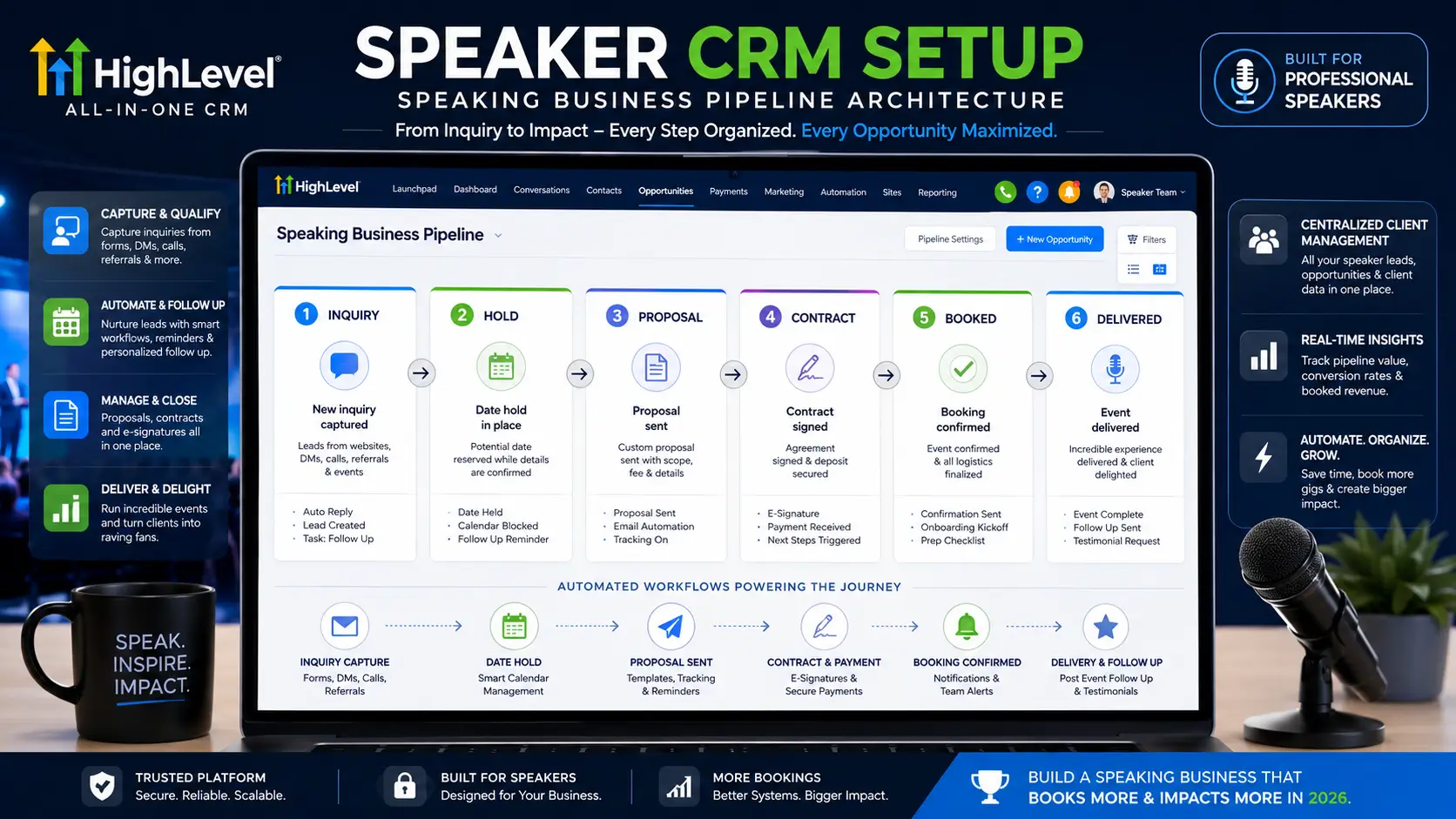
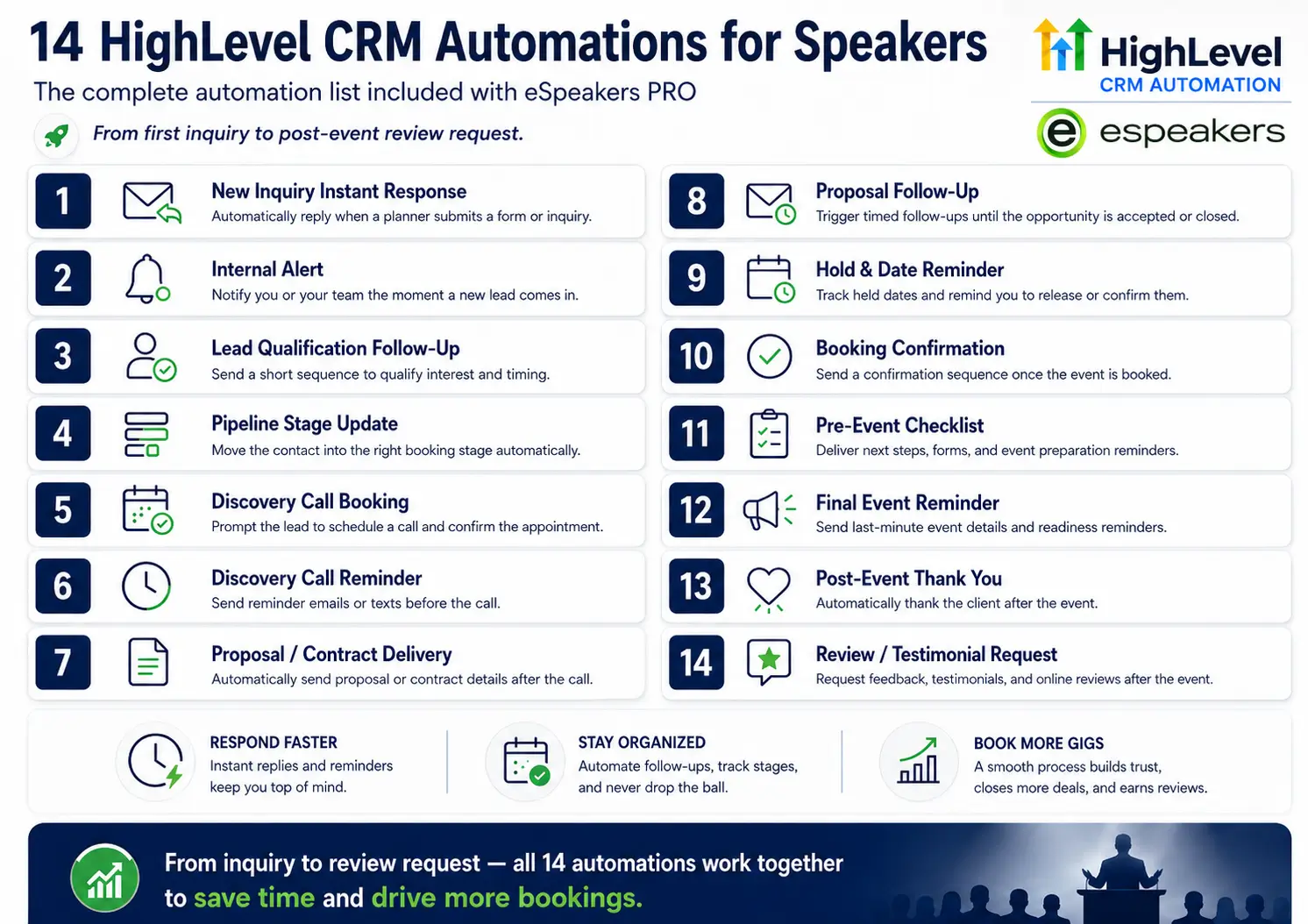
Together, connected through the eSpeakers PRO integration, they create the loop described throughout this series: a planner finds you on eSpeakers, submits an inquiry that enters your HighLevel pipeline automatically, receives an instant acknowledgment, moves through your automated pre-event sequence, and generates testimonials and referrals that strengthen your eSEO score for the next planner. The platform handles both the public-facing storefront and the back-office operations in a connected system.
Monthly cost: eSpeakers PRO is $119/month and includes HighLevel as part of the bundle, replacing the $350–$500/month collection of tools most speakers are currently paying for separately.
What it replaces: Standalone CRM (HubSpot, Salesforce, Pipedrive), standalone email marketing (Mailchimp, ActiveCampaign, ConvertKit), standalone scheduling (Calendly, Acuity), standalone funnel builder (ClickFunnels, Leadpages), standalone invoicing (separate from the above, like Stripe), Zapier connections between all of the above, and the time spent managing their failure points.
The rest of this article covers the tools that supplement this core platform, the ones you still need beyond it, and the ones you can eliminate.
Presentation Software: What Speakers Actually Use
Presentation software is the one tool category where speakers typically don't need to consolidate, because the right choice depends almost entirely on your presentation style and client delivery context.
Apple Keynote
Remains the choice for Mac-based speakers who prioritize visual quality and smooth live delivery. Its default animations, typography rendering, and presenter view are genuinely excellent, and the rehearsal tools are better than any competing platform. The limitation is ecosystem: Keynote doesn't export cleanly to .pptx, which matters when clients ask for your deck in advance. For speakers working primarily in corporate environments where IT controls the presentation computer, Keynote creates friction. For speakers who control their own presentation environment, it's the best option.
Microsoft PowerPoint with Copilot
Microsoft PowerPoint with Copilot is the corporate standard for a reason. In 2026, Copilot integration allows AI-generated slides from a prompt, smart design suggestions, and automated speaker notes, meaningful upgrades for speakers who build customized decks for each engagement. The ecosystem support is unmatched: every event venue can run a .pptx file. If you're regularly customizing decks for different corporate audiences and sending files ahead of time, PowerPoint is the practical default.
Canva
Canva has emerged as the preferred tool for speakers who prioritize visual appeal without design expertise. Its template library, brand kit management, and ease of use make it the fastest path from outline to beautiful slides. The limitation is that Canva presentations are best when you control the playback environment; they don't export to .pptx as cleanly as native PowerPoint files, and some complex animations are lost in export. For a consistent speaking deck that you own and deliver yourself, Canva is excellent. For decks you need to hand off, build in PowerPoint, and apply Canva's design sensibility.
One recommendation most speakers ignore
Build and maintain a single master deck that you customize per engagement, rather than rebuilding from scratch for every event. The customization should be the opening story, a few audience-specific examples, and the closing call to action, not the structural framework of the program. Master deck plus customization layer equals half the prep time at twice the relevance.
Contract and E-Signature Tools
The contract execution step is where a confirmed hold becomes a confirmed booking, and where delays most often cause a planner to back out. The faster and smoother the contract experience, the higher the hold-to-confirmed conversion rate.
If you're running eSpeakers + HighLevel CRM, HighLevel includes proposal generation, document signing, and contract templates natively. For speakers who want to build their contract workflow inside the same system as their pipeline, CRM, and calendar, this is the path of least resistance.
If you need a standalone e-signature tool, DocuSign remains the industry standard that every corporate legal department recognizes and trusts. HelloSign (now Dropbox Sign) offers a cleaner UX at a lower price point. PandaDoc bundles contract management with proposal creation and is worth considering if your proposals are detailed and you want them to convert directly to contracts with a single signature.
The key functional requirement for speaker contracts: the tool needs to allow you to create a template, personalize it per engagement (fee, date, deliverables, event name, client contact), and send for signature in under five minutes. If your contract process takes longer than that, you're losing hold of the friction.
Invoicing and Payment Processing
The goal: get paid quickly, with zero friction for the planner and minimal administrative overhead for you.
HighLevel includes invoicing natively with Stripe integration for payment processing. For speakers running the eSpeakers + HighLevel system, this covers basic invoicing without additional subscriptions.
For speakers who want more accounting infrastructure, QuickBooks is the standard. The HighLevel/Stripe integration syncs with QuickBooks, so your invoice data flows into your accounting system without manual entry. If you’re tracking multiple revenue streams (keynotes, workshops, book sales, online courses), QuickBooks provides the reporting infrastructure that a simple invoicing tool doesn’t.
What to avoid: separate invoicing tools that don’t connect to your CRM or your accounting system. Every invoice that has to be manually entered in two places is a potential error and an administrative burden. Stripe, as a standalone payment processor connected through Zapier to a separate invoicing tool connected to a separate CR, is the kind of fragmentation that HighLevel eliminates.
The specific speaker payment workflow that matters: 50% deposit due within 10 days of contract signing, 50% balance due 30 days before the event date (or net-30 after, depending on the client). Automate the reminders. HighLevel’s invoice follow-up workflow fires payment reminders automatically, covered in the automations articles in this series, so the balance collection never requires manual intervention.
Email Marketing
This is the tool category where the most money is wasted on redundant subscriptions.
A typical speaker is paying for Mailchimp or ActiveCampaign in addition to whatever CRM they're using, because their CRM's email features "weren't as good" when they originally set up their marketing. In 2026, that's almost always a historical artifact, not a current reality.
HighLevel's email marketing system handles everything a speaking business needs: broadcast campaigns, drip sequences, automated nurture workflows, audience segmentation, A/B testing, and deliverability management. The critical advantage isn't the feature list; it's that HighLevel email is natively connected to the same contact database as your pipeline, your automation triggers, and your Smart Lists. A contact who moves from "warm lead" to "Confirmed" in your pipeline automatically stops receiving the warm-lead nurture sequence, because the CRM and the email system share the same data layer. With a separate email tool, the sync requires a Zapier automation that breaks quarterly. The only scenario where a separate email marketing platform makes sense for a speaking business is if you're running a newsletter with 10,000+ subscribers and need the deliverability infrastructure and advanced analytics of a dedicated platform like ConvertKit or ActiveCampaign. For most speakers, HighLevel's email system is sufficient, and the integration advantage outweighs any feature gap.
Scheduling and Calendar Tools
HighLevel’s calendar system covers the scheduling needs of most speaking businesses: booking types for discovery calls and prep calls, automatic confirmation and reminder emails, time zone management, Google Calendar and Outlook sync, and native connection to the CRM pipeline (a booked call creates or updates the contact record automatically).
Calendly remains the market standard for a reason: it’s the simplest possible scheduling experience for the planner on the other end. If your booking process involves sending a link to a planner and having them self-schedule a call with no friction, Calendly’s clean interface and widespread recognition make it easier for planners who may never have encountered HighLevel’s booking page.
The honest answer: most speakers can replace Calendly with HighLevel’s native calendar and never notice the difference. The speakers who should keep Calendly are those whose booking calls involve complex routing (round-robin scheduling across a team, conditional availability based on event type) or those who have deeply embedded Calendly links across their email signature, website, and outbound campaigns that would be disruptive to change.
Video Tools
A speaking business has two distinct video needs that require different tools.
Presentation video for virtual/hybrid events
Zoom remains the standard for virtual keynotes, discovery calls, and prep calls. Its integrations with calendars, recording, and professional lighting/audio equipment are well-established. No compelling reason to change unless a client specifically requests a different platform.
Video editing for reels and content
This is where most speakers are either over-investing or under-investing.
For speakers producing their own content without a production partner, Descript has become the standout tool for text-based video editing. You edit the video the way you edit a Word document, delete words from the transcript, and the corresponding video is removed. For speakers cutting their own social content from keynote footage, podcast appearances, or interview recordings, Descript dramatically reduces the skill barrier to produce usable clips.
CapCut (for mobile, quick social clips) and DaVinci Resolve (for serious, full-featured desktop editing) cover the remaining spectrum from fastest-to-publish to most-capable. Most speakers don’t need DaVinci Resolve’s complexity; Descript handles the use cases that professional speakers actually have.
For speakers who are not editing their own content
Video editing is one of the highest-leverage VA tasks available to a speaking business. A part-time VA who knows Descript can turn a 45-minute keynote recording into 6–8 social clips, a demo reel update, and a YouTube upload per week, for 4–6 hours of VA time. That’s a better return on investment than any tool purchase.
Social Media and Content Tools
Posting and scheduling
HighLevel's Social Planner covers social media scheduling natively, which is sufficient for speakers maintaining a consistent LinkedIn and YouTube presence. For speakers running more sophisticated multi-platform social strategies, Buffer or Hootsuite provides better analytics and workflow tools, but the integration benefit of staying in HighLevel for scheduling usually outweighs the analytics advantage unless you're posting very high volume.
LinkedIn specifically
LinkedIn's native scheduling and analytics are good enough for most speakers, and the native post format gets better algorithm treatment than third-party scheduled posts on some content types. Post natively for LinkedIn; use a scheduler for Instagram and YouTube.
Content creation for social
Canva covers graphic design, quote cards, carousel posts, and simple video content for social. Opus Clip has emerged as the AI tool of choice for automatically generating short video clips from long-form footage. It identifies the most engaging segments, captions them, and formats them for vertical video. For speakers who record keynotes and want to extract social content without manual editing, Opus Clip is legitimately useful.
AI Tools That Are Actually Worth Using
The AI landscape for speaking businesses is genuinely useful in a few specific areas and overhyped in most others.
AI that's worth using right now:
Research and customization: ChatGPT, Claude, or Perplexity for researching a client’s industry before a prep call, drafting customized examples for a specific audience, or quickly understanding an organizational challenge your keynote can address. This is the highest-ROI AI use for speakers: 20 minutes of AI research before a prep call replaces two hours of web searching and produces better customization.
Email drafting: AI-assisted first drafts of outbound pitch emails, follow-up sequences, and planner communications significantly reduce writing time. The key is editing the output to match your voice. AI drafts start at 60% quality and get to 90% with 5 minutes of editing.
Transcription: Otter.ai or Rev for transcribing keynote recordings, podcast appearances, and prep call notes. Searchable, accurate transcripts turn recorded conversations into reference documents.
Slide generation: For speakers building customized decks quickly, Gamma or Beautiful.ai can generate a 10-slide deck from a prompt in under two minutes. The output requires editing, but the structure saves meaningful setup time for custom programs.
HighLevel's AI Employee, practical applications for speakers:
Conversation AI on your website chat widget handles planner questions after hours, availability, fees, topics, and the booking process, without requiring your involvement. A planner who messages at 10 PM gets an intelligent, personalized response instead of waiting until morning.
Voice AI can handle inbound phone inquiries, collecting event details, answering FAQs, scheduling discovery calls, and functioning as a 24/7 first-touch for speakers who can’t always answer their phone.
Workflow AI helps build and optimize automation sequences, reducing the technical setup time for new workflows.
AI that's not worth your attention yet:
AI video avatars presenting on your behalf, fully AI-generated keynote content, and AI that claims to “replace” the speaker-planner relationship. These are solutions to problems that don’t exist for the speaking business, and they create brand risks (authenticity concerns, quality inconsistency) that outweigh any efficiency gains.
Tools You Can Almost Certainly Eliminate
Based on the pattern of what professional speakers are paying for versus actually using, these are the most common redundant subscriptions:
A separate email marketing platform
If you're on HighLevel, your email marketing is already included. Mailchimp, ActiveCampaign, or ConvertKit on top of HighLevel is double-paying for the same function with worse integration.
A standalone scheduling tool
If you're on HighLevel, your scheduling is included. Calendly is a good tool, but it's a redundant cost unless you have specific scheduling requirements that HighLevel can't meet.
A standalone funnel builder
ClickFunnels, Leadpages, or Unbounce on top of HighLevel is triple-paying for landing pages.
Zapier subscriptions connecting tools you no longer need
Zapier is the duct tape that holds together a fragmented stack. When you consolidate, the duct tape becomes unnecessary. Audit your Zapier zaps quarterly and delete any that connect tools you've replaced.
A note-taking or task management tool that duplicates HighLevel
If you're maintaining a separate Asana, Notion, or Todoist alongside HighLevel's task management and pipeline, you have two systems of record. Choose one and migrate.
Why HighLevel Is the Right CRM for Speakers, Not a General-Purpose Alternative
Speakers evaluating CRM options often start with tools built for other industries: HubSpot, Salesforce, Pipedrive, or generic small-business CRMs like HoneyBook or Dubsado. Each of these is a legitimate tool. None of them is built for what a speaking business actually needs.
The speaking business is unusual
Most CRMs are designed for sales teams to convert prospects into paying customers through repeated touchpoints over weeks or months. A speaking business runs a fundamentally different cycle: an inquiry, a hold, a contract, a delivery, and then a long quiet period before the next engagement with the same client, often 12 to 18 months. Most general-purpose CRMs optimize for short sales cycles and repeat transaction frequency. Neither describes how a speaking business works.
HubSpot is the most polished general-purpose CRM in the market, with excellent free-tier contact management and a genuinely strong email marketing system at the paid tier. The limitation for speakers is cost: meaningful marketing automation in HubSpot, the email sequences, workflow triggers, and funnel capabilities that the marketing system articles in this series describe, start at Marketing Hub Professional, which runs $890 per month for three seats. For a solo speaking business that needs those capabilities, that pricing is prohibitive.
Salesforce is enterprise software designed for organizations with dedicated CRM administrators and complex multi-team sales processes. No solo or small-team speaking business should be on Salesforce.
HoneyBook and Dubsado serve creative service businesses well for contract, invoicing, and client onboarding workflows. They're not built for the pipeline management, automation depth, email marketing, or funnel building that a speaking business at any meaningful scale needs. They also don't integrate natively with eSpeakers.
HighLevel is the right CRM for speakers because it was built for exactly this type of business. Service-based, relationship-driven, dependent on fast follow-up, and needing to run marketing automation without a full marketing team. Its pipeline management, workflow automation, email marketing, SMS, funnel builder, calendar integration, and AI Employee tools are all native, not connected via third-party integrations. And through the eSpeakers PRO integration, it connects directly to the directory and calendar infrastructure that speakers live in.
The combination is the point. HighLevel without eSpeakers is a powerful general marketing platform. eSpeakers without HighLevel is a directory and event management system. Together, with the native integration, they form the only CRM environment that covers all five functions of a speaking business, Discovery, Capture, Nurture, Transaction, and Delivery, from a single connected system.
Building Your Stack: The Two-Phase Approach
Most speakers shouldn’t try to implement everything at once. The right approach is sequential, building on a working foundation before adding complexity.
Phase 1: The Foundation (Weeks 1–4)
Get the core platform running: eSpeakers PRO profile optimized and live, HighLevel CRM with contact import, booking pipeline configured, and the four highest-priority workflows built (new inquiry response, contract follow-up, post-event sequence, and long-term nurture). This is the minimum viable speaker tech stack, and for many speakers, it’s already more sophisticated than what they’re currently running.
Phase 2: Marketing Infrastructure (Weeks 5–10)
Layer in the marketing system: the inquiry funnel and lead magnet funnel built in HighLevel, email sequences for the Welcome/Delivery and Long-Term Nurture flows, and social media scheduling connected. Update your presentation software choice and consolidate any redundant tools you identified in Phase 1.
After Phase 2, your stack should look like this:
| Function | Tool | Monthly Cost |
| Directory + Calendar Management | eSpeakers PRO | Included in bundle |
| CRM + Pipeline + Email + Automation + Funnels + AI | HighLevel CRM | Included in bundle |
| Presentation software | Keynote / PowerPoint / Canva | Free–$22 |
| Contract/E-signature | Native in HighLevel or DocuSign | $0–$25 |
| Invoicing/Payments | Native in HighLevel + Stripe | $0 + processing fees |
| Video editing | Descript | $24 |
| Accounting | QuickBooks | $35 |
| AI research/writing assistant | Claude / ChatGPT | $20 |
| Estimated monthly total | ~$220–$250 |
That’s the complete tech stack for a full-service professional speaking business in 2026, compared to the $350–$500/month (or more) that most speakers currently spend on a less-integrated collection of tools.
The financial argument is real, but it’s secondary. The primary argument is operational: a stack built around a central platform that shares data between functions is a stack that produces reliable automation, accurate pipeline reporting, consistent planner experiences, and fewer manually-managed failure points. That’s the difference between a speaking business that feels like it’s always on the edge of dropping something and one that runs predictably while you’re focused on the work that actually matters, what happens on stage.
FAQ
The switching question always involves real friction costs, data migration, rebuilding automations, and the learning curve. Whether it’s worth it depends on what you’re currently on. If you’re on HubSpot Free with a separate email tool: yes, consolidating on HighLevel saves money and improves integration. If you’re on HubSpot Professional with the marketing automation suite, run the cost comparison. HighLevel, at the same feature depth, costs roughly 70–80% less. If you’re on a simple contact manager or spreadsheet, switching to HighLevel is an upgrade worth making as soon as you’re confirming 5+ engagements per year.
Several tools have been marketed specifically to speakers over the years. In 2026, HighLevel’s automation depth, native eSpeakers integration, email marketing, and AI capabilities cover and typically exceed what any of those niche tools provide, without the limitations of a smaller platform’s development pace. If you’re on one of them and happy, finish your current commitment. If you’re evaluating from scratch, there’s no compelling reason to choose a more limited tool when HighLevel is available at a comparable price point through the eSpeakers PRO bundle.
HubSpot is a genuinely excellent CRM, and if you’re getting value from it, the friction of switching has a real cost. The specific argument for switching to HighLevel is: HubSpot at the marketing automation tier you need (Marketing Hub Professional) costs $890/month for three seats. HighLevel has the same functionality and costs $97–$297/month. For a speaking business that needs email marketing, automation, and funnel building alongside CRM, not just CRM, the cost difference is significant. If you’re using HubSpot’s free CRM and a separate email tool, consolidating on HighLevel typically saves money and improves integration.
Start with eSpeakers Basic (free tier) for your directory presence. Use Google Calendar for scheduling. Use a free contract template in PDF for your first few engagements. Build your first HighLevel account during the 60-day PRO trial period and migrate from free tools as you’re confirming engagements. The eSpeakers PRO + HighLevel stack pays for itself after a single additional booking per year, usually much faster.
The full stack described in this article takes 15–20 hours of focused setup spread over two to three weeks. The shortcut is the eSpeakers PRO onboarding program, which walks you through the 60-day success curriculum and includes pre-built workflow templates and calendar integration that reduce the setup time significantly.
The Stack Is the Strategy
The tools you choose and how you connect them aren’t administrative decisions. Their strategy. A stack that shares data produces insights. A stack with automation produces scale. A stack built around one central platform produces the consistent, professional experience that planners remember when they’re deciding who to book next year.
The speakers running the most organized, most profitable businesses in 2026 aren’t the ones with the most sophisticated technology. They’re the ones who chose a core platform, built it correctly, and eliminated the tools that didn’t connect to it.
That’s achievable this quarter. The stack described in this article is buildable in a month. And once it’s running, it runs, freeing up the time and mental bandwidth that currently goes into managing tools to go toward the work that actually grows the business: better content, stronger relationships, and more time on stage.
Start your eSpeakers PRO 60-day trial →
eSpeakers PRO includes the complete HighLevel CRM environment, pre-built speaker workflows, calendar integration, and the 60-day success training program that walks you through every component of the stack described in this article.
Joe Heaps, Chief Marketing Officer at eSpeakers
Joe Heaps is the Chief Marketing Officer at eSpeakers and is responsible for creating and accelerating the company's sales & marketing strategies. He is focused on driving the company's vision of helping organizations and individuals improve in substantial, long-term ways. He believes it happens when the perfect speaker is in front of the right audience. Over 25 years in the industry, Joe’s strategic vision and leadership have propelled eSpeakers to the leading software platform for speakers, coaches, and experts.
Joe Heaps
Chief Marketing Officer, eSpeakers
Latest Articles


Related Articles