The Ultimate Speaker CRM Setup: HighLevel Workflows, Funnels, and Automations
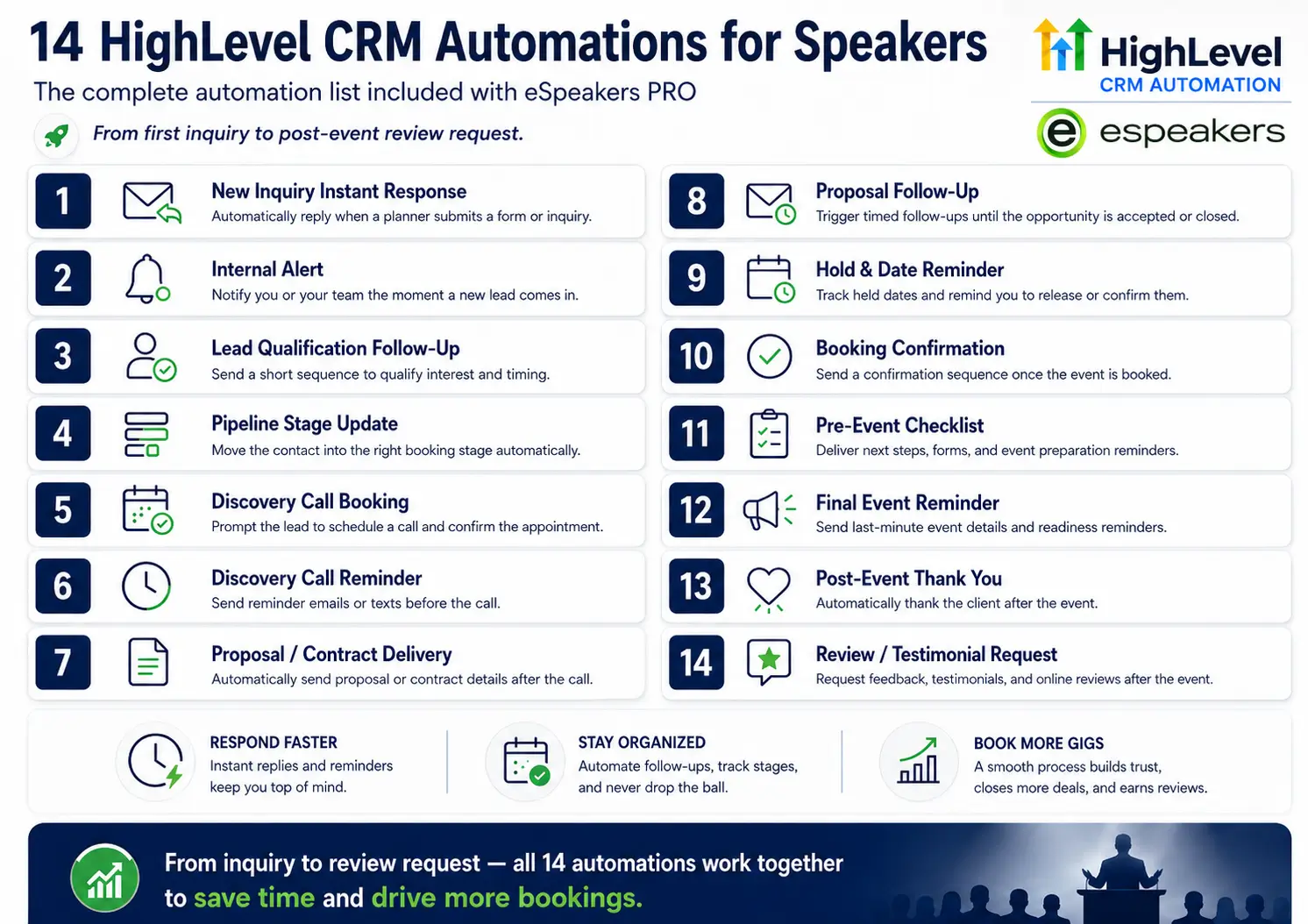
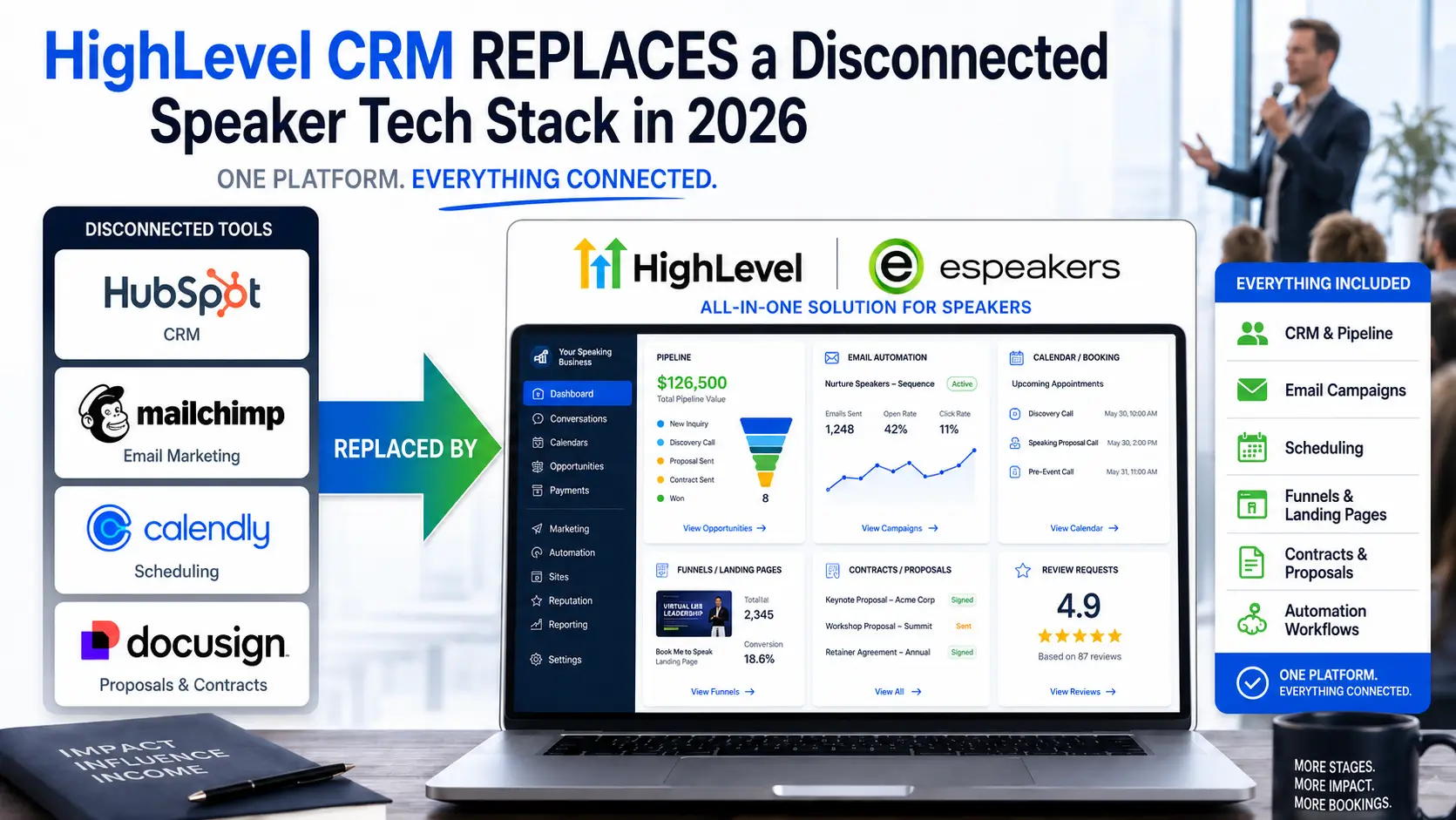
A properly configured HighLevel CRM for speakers automates inquiry response, manages holds, sends contracts, triggers pre-event logistics sequences, and follows up with post-event review requests, all without manual intervention. Most speakers who set it up and don't get results make one mistake: they start building features before they build the underlying architecture. Workflows don't work well without clean pipeline stages. Email campaigns underperform without a properly authenticated sending domain. Funnels don't convert without a clear destination in the CRM.
This guide builds the architecture correctly, in the right order, specifically for a professional speaking business. The sequence matters: sending domain authentication first, then pipeline stages, then contact tagging, then the seven core workflows, then the two funnels that capture leads from your web presence. By the end, you will have a speaker CRM running automated follow-up across the full booking lifecycle, connected directly to your eSpeakers Marketplace profile and eSpeakers calendar, with minimal daily intervention required.

John Doe
Chief Marketing Officer at eSpeakers
Phase 1: Account Architecture, Build This Before Anything Else
The most common setup mistake in HighLevel is skipping the architecture phase and jumping straight to building. Architecture takes an afternoon. Skipping it costs weeks of cleanup later.
Step 1: Set Up Your Sending Domain
Before you send a single email, configure a dedicated sending subdomain. This is the single most important technical step in your HighLevel setup, and the one most beginners skip.
If your website is yourspeakersite.com, create a subdomain like mail.yourspeakersite.com or em.yourspeakersite.com. Add this subdomain to HighLevel under Settings → Email Services, and authenticate it with the required DNS records (DKIM, SPF, DMARC). For technical guidance on DNS authentication, Google’s email sender guidelines cover DKIM, SPF, and DMARC requirements that apply to all professional email senders. This keeps your email marketing activity isolated from your root domain’s reputation, so if a campaign underperforms, it doesn’t affect your transactional emails or website deliverability.
Do not send campaigns from an unverified or root domain. List your From address as something like [yourname]@mail.yourspeakersite.com consistently across all outbound email. This is table stakes for inbox placement in 2026.
Step 2: Configure Your Contact Tags
Tags in HighLevel are manual labels applied to contacts that provide context beyond what the pipeline stage alone can capture. Before importing any contacts, define your tag taxonomy. For a speaking business, a clean starting set looks like this:
Source tags (where the contact came from):
- source-espeakers
- source-referral
- source-website
- source-conference
- source-linkedin
- source-bureau
Relationship tags (what kind of contact they are):
- planner-corporate
- planner-association
- planner-npo
- planner-education
- past-client
- bureau-agent
- warm-lead
- cold-lead
Topic interest tags (what they’ve expressed interest in):
- topic-leadership
- topic-ai
- topic-culture
- topic-sales
- topic-virtual
Status tags (flags for special handling):
- vip
- do-not-contact
- hold-active
- testimonial-received
- re-engagement
Keep your tag list short and meaningful. Tags that aren’t consistently applied are noise. Aim for five to eight tags per contact maximum, and build workflows that apply tags automatically wherever possible. For example, any contact who submits your inquiry form automatically receives source-website, and any contact who books through your eSpeakers profile automatically receives source-espeakers.
Bureau agent relationships are governed by standards set by the International Association of Speakers Bureaus (IASB); tagging and segmenting these contacts separately reflects their distinct professional context.
Step 3: Build Your Speaker Booking Pipeline
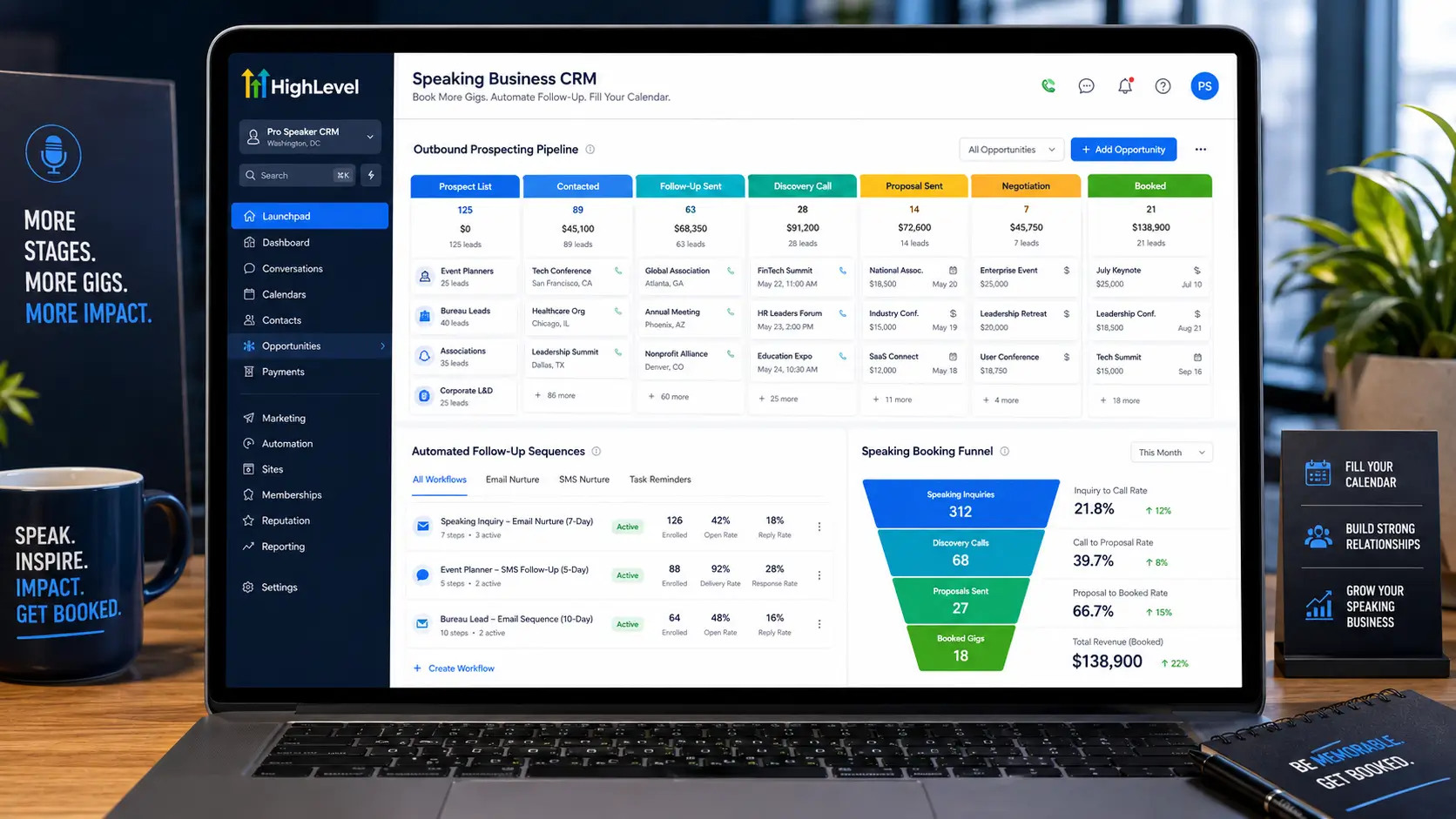
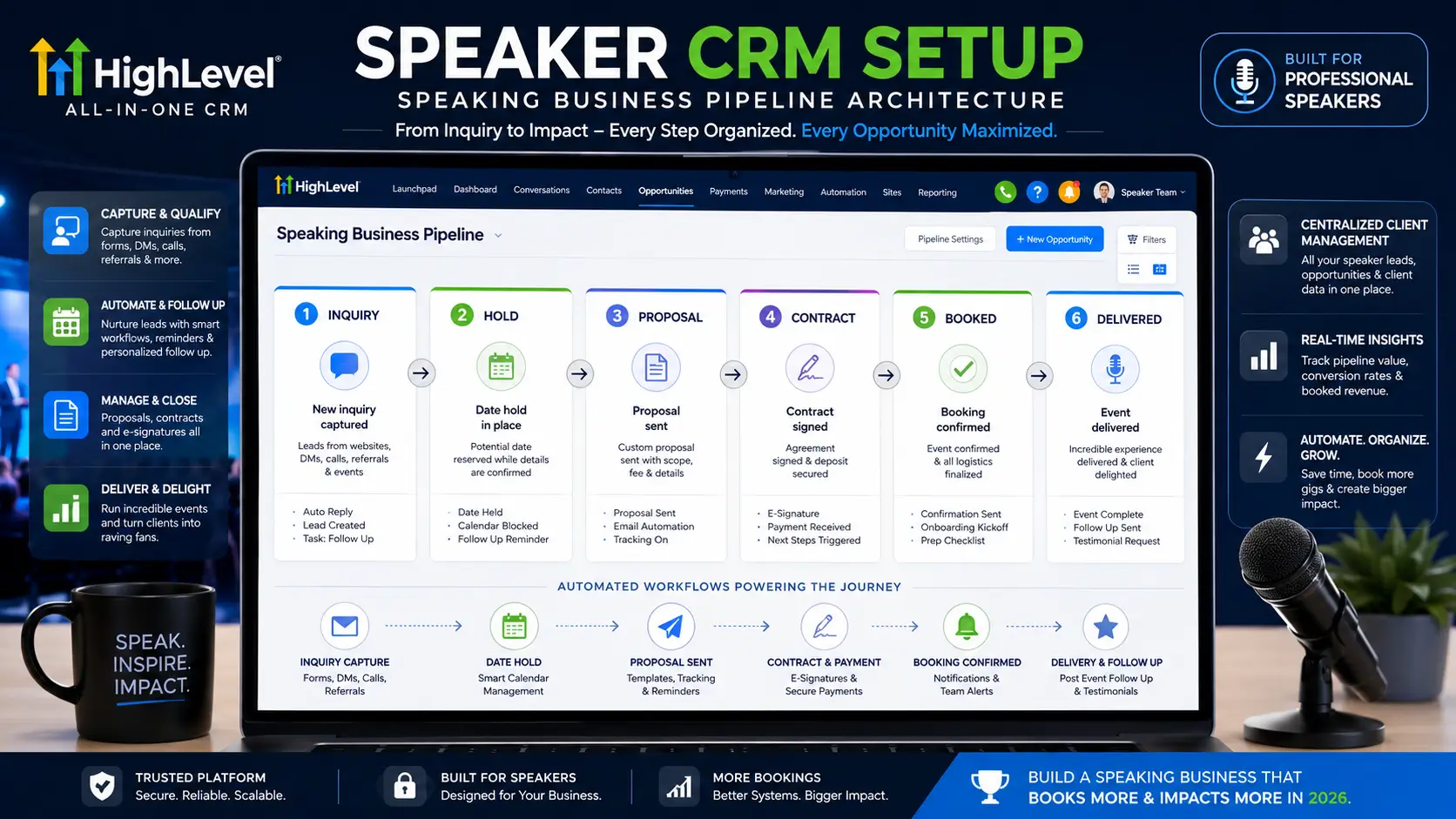
HighLevel’s CRM organizes active opportunities, inquiries, holds, and confirmed bookings inside visual pipeline boards. Your pipeline stages should mirror the actual lifecycle of a speaking engagement. Here is the recommended stage structure for a speaking business:
Stage 1, New Inquiry
The contact has reached out and expressed interest. No commitment yet. This is where every new inbound inquiry lands automatically.
Stage 2, Discovery Call Scheduled
A 15-minute call has been booked to discuss the event, audience, and fit. Used when you need more information before providing a proposal or confirming availability.
Stage 3, Proposal Sent
You’ve sent a formal proposal including your fee, travel requirements, and deliverables. The ball is in their court.
Stage 4, Hold Confirmed
The planner has requested a date hold. Contract and deposit have not yet been finalized, but the date is tentatively reserved.
Stage 5, Contract Out
A signed contract has been sent. Awaiting signature and deposit.
Stage 6, Deposit Received
The contract is signed, and the deposit has cleared. The booking is confirmed.
Stage 7, Pre-Event Active
The engagement is in the preparation window: prep calls scheduled, AV requirements sent, customization in progress.
Stage 8, Delivered
The event has taken place. Post-event follow-up sequence has been triggered.
Stage 9, Invoiced / Payment Pending
Final invoice sent. Awaiting balance payment.
Stage 10, Closed / Complete
Payment received, testimonial requested, engagement fully complete. Move here once everything is wrapped.
HighLevel automatically adds Won and Lost stages to every pipeline, uses Closed / Complete as your equivalent of Won, and maintains Lost for inquiries that didn’t convert, with a reason code applied as a tag (lost-budget, lost-timing, lost-to-competitor, etc.) for future analysis.
Create a second, separate pipeline for your Lead Nurture track: warm leads who aren’t ready to book yet, past clients for re-engagement outreach, and contacts in long-term nurture sequences. Keeping active booking opportunities separate from long-term nurture contacts keeps your primary pipeline clean and actionable.
Step 4: Set Up Smart Lists
Smart Lists are HighLevel’s live-updating contact segments; they automatically add or remove contacts based on criteria you define, functioning like saved searches that stay current in real time. Set up these six Smart Lists after configuring your tags and pipeline:
- Active Holds, Filter: Pipeline Stage = “Hold Confirmed” → Shows all current holds that need monitoring.
- Contracts Out > 5 Days, Filter: Pipeline Stage = “Contract Out” AND Date Entered Stage > 5 days ago → Your immediate follow-up priority
- Warm Leads, No Activity 30 Days, Filter: Tag = “warm-lead” AND Last Activity > 30 days ago → Re-engagement candidates
- Past Clients, No Contact 12 Months, Filter: Tag = “past-client” AND Last Contacted > 365 days ago → Re-booking outreach
- Testimonial Pending, Filter: Pipeline Stage = “Delivered” AND Tag does NOT include “testimonial-received” → Outstanding testimonial requests
- Pre-Event Active, Prep Call Not Scheduled, Filter: Pipeline Stage = “Pre-Event Active” AND no upcoming appointment → Prep calls to book
These six Smart Lists replace the mental overhead of “remembering who needs what.” Every morning, a two-minute scan of these lists tells you exactly where your business needs attention.
Phase 2: The 7 Core Workflows
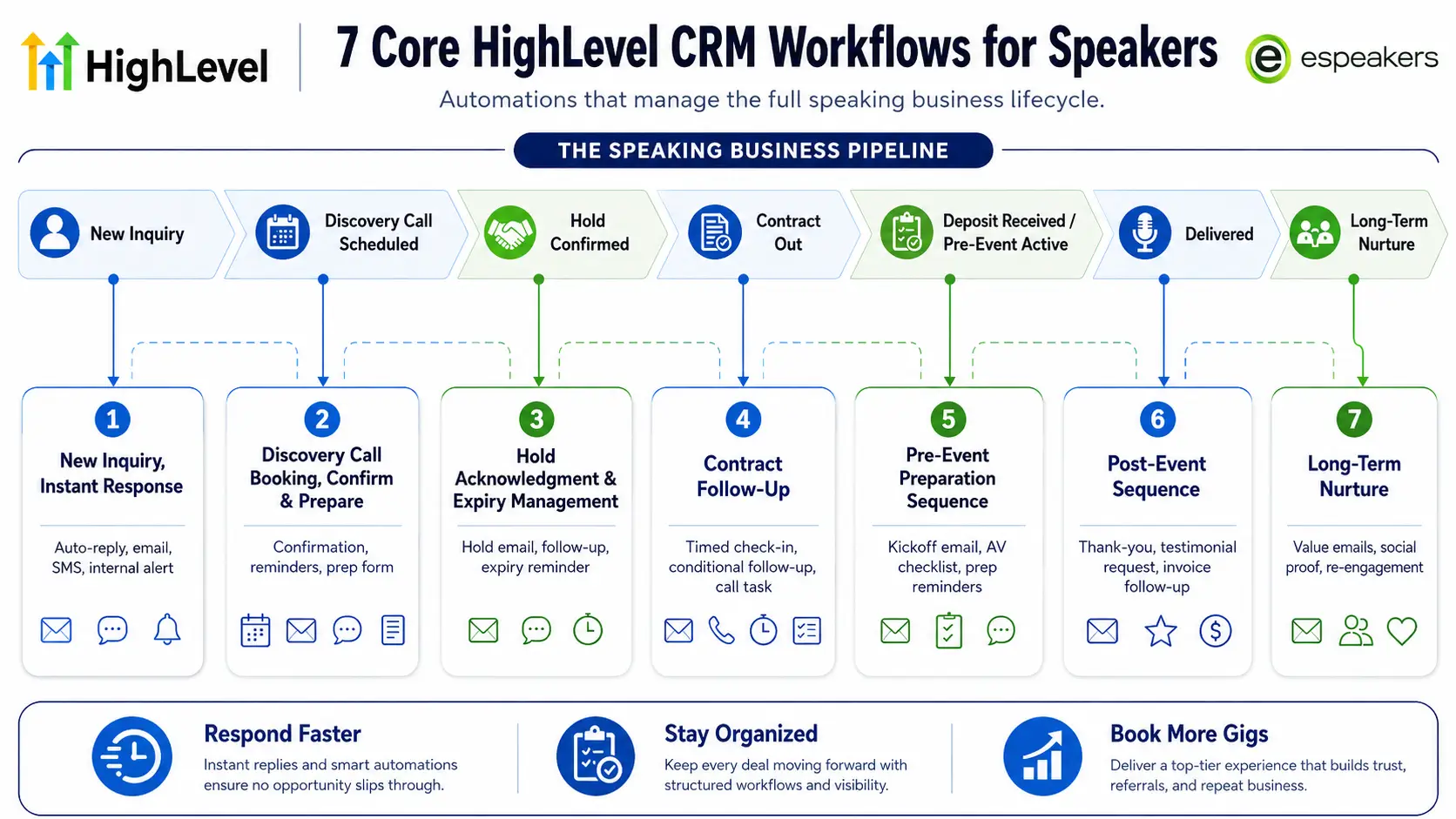
Workflows are the operational engine of your speaker CRM with automation. Each workflow is a sequence of triggers and actions: when X happens, do Y (and Z and W). Here are the seven workflows every speaker needs, built in order of priority.
A note on structure before building: every workflow needs a clear entry trigger and an exit trigger. Without exit logic, contacts can get trapped in sequences they've already completed, or receive messages that no longer apply. Always add a "Stop Workflow" or "Remove from Sequence" action when a contact's status changes to something the workflow was designed to respond to.
Workflow 1: New Inquiry, Instant Response
Purpose: Acknowledge every new inquiry within minutes, regardless of whether you’re available.
Trigger: Form submitted (your speaker inquiry form) OR New contact added via eSpeakers integration
Actions:
- Add tag: source-[appropriate source]
- Create opportunity in pipeline: Stage = “New Inquiry”
- Wait: 0 minutes (immediate)
- Send SMS: “Hi {{contact.first_name}}, thanks for reaching out about {{custom_field.event_name}}! I’ll review your inquiry and be in touch within one business day. In the meantime, you can check my availability at [eSpeakers profile link].”
- Send email: Formal acknowledgment email with your bio, sample topics, and a link to your speaker profile (pre-written template)
- Internal notification: Email or app notification to you with the inquiry details
- Wait: Until business hours (critical, prevents automated messages firing at 2 am)
Exit trigger: Contact moves out of “New Inquiry” stage
Why this matters: The average business takes 47 hours to respond to a new lead. This workflow responds in under five minutes. That alone puts you ahead of the majority of speakers a planner might be evaluating simultaneously.
Workflow 2: Discovery Call Booking, Confirm, and Prepare
Purpose: Make every discovery call feel effortless for the planner and fully prepared for you.
Trigger: Appointment booked in HighLevel calendar (discovery call event type)
Actions:
- Move pipeline to: “Discovery Call Scheduled.”
- Send email (immediate): Confirmation with call details, Zoom/phone link, and a brief preparation note: “To make our call as useful as possible, I’d love to know a bit about your audience and event goals in advance. [Link to 3-question pre-call form].”
- Wait: Until 24 hours before the appointment.
- Send SMS reminder: “Looking forward to our call tomorrow at {{appointment.time}}, {{contact.first_name}}. Here’s the link: [link].”
- Wait: Until 1 hour before the appointment.
- Send SMS: “We’re on in an hour, see you at {{appointment.time}}!”
- Internal notification: Reminder to review pre-call form responses before the call
Exit trigger: Appointment completed OR Appointment canceled/rescheduled (trigger separate rescheduling workflow)
Workflow 3: Hold Acknowledgment and Expiry Management
Purpose: Document every hold formally, communicate professionally, and prevent holds from expiring silently.
Trigger: Pipeline stage changes to “Hold Confirmed”.
Actions:
- Add tag: hold-active
- Send email (immediate): “Hi {{contact.first_name}}, I’ve placed a hold on [event date] for [organization]. This hold is confirmed through [expiry date, set as a custom field]. If you need to extend or confirm before then, just let me know. I’ll follow up as the date approaches.”
- Wait: Until 50% of the hold window has elapsed (e.g., if a 14-day hold, wait 7 days)
- Send email: “Following up on the hold for [date], wanted to check in on where things stand. Happy to discuss any questions before you finalize.”
- Wait: Until 2 days before hold expiry.
- Send SMS: “Quick note, the hold on [date] expires in 2 days. Happy to extend if you need more time, or to move forward whenever you’re ready.”
- Internal notification: Flag to follow up by phone if no response
Exit trigger: Pipeline stage changes (either to “Contract Out” = hold converted, or back to “New Inquiry” / “Lost” = hold released)
Workflow 4: Contract Follow-Up, No More Waiting in Silence
Purpose: Ensure every sent contract gets a professional follow-up and doesn’t go cold.
Trigger: Pipeline stage changes to “Contract Out.”
Actions:
- Wait: 5 business days (use business hours filter, do not count weekends)
- Condition: IF pipeline stage is still “Contract Out” → proceed; IF stage has changed → exit workflow
- Send email: “Hi {{contact.first_name}}, checking in on the contract for [event date]. Happy to answer any questions or adjust anything before you sign. Let me know how to help move this forward.”
- Wait: 3 more business days.
- Condition: IF pipeline stage is still “Contract Out” → proceed; IF changed → exit
- Internal notification: Flag to call directly, do not send another automated message
Exit trigger: Pipeline stage changes out of “Contract Out.”
Important note: Stop the automated follow-up after the second touch. A third automated email starts to feel like pressure, not service. The internal notification in step 6 is a prompt for a personal call, which is a stronger close than another templated message.
Workflow 5: Pre-Event Preparation Sequence
Purpose: Deliver a professional, consistent pre-event experience for every confirmed engagement, without relying on memory.
Trigger: Pipeline stage changes to “Deposit Received” (booking confirmed)
Actions:
- Move pipeline to: “Pre-Event Active.ve.”
- Send email (immediate): Welcome and kickoff email confirming the engagement, next steps, and what to expect from you in the run-up to the event.
- Create internal task: “Send AV/tech requirements checklist to event team”, due in 48 hours.
- Wait: 3 days
- Send email: AV and technical requirements (pre-written template with your standard setup, customizable per event)
- Create internal task: “Schedule prep call with event organizer”, due in 7 days.
- Wait: Until 14 days before event date (use date-based wait, not time delay)
- Send email: Pre-event brief request, audience demographics, key messages, any sensitivities or context.
- Wait: Until 3 days before the event.
- Send email: Final confirmation, travel logistics, arrival time, green room needs, and schedule of the day.
- Internal notification: Final prep reminder with event details summary
Exit trigger: Pipeline stage changes to “Delivered.d”
Customization note: The timing in steps 7–11 assumes a confirmed booking where the event is at least 3–4 weeks out. For last-minute bookings, build a compressed variation of this workflow with tighter timing windows.
Workflow 6: Post-Event Sequence, The 72-Hour Window
Purpose: Capture the highest-value post-event actions in the window when they’re most likely to succeed.
Trigger: Pipeline stage changes to “Delivered.”
Actions:
- Wait: 2 hours (let the adrenaline settle before the first message fires)
- Send email: Genuine thank-you to the event organizer, specific, personal, referencing something from the day. This email should not be automated wholesale; use a template that requires you to insert one personal sentence before it fires, or configure a 24-hour delay to allow manual personalization. See note below.
- Wait: Until 24 hours after the stage change.
- Send email: Testimonial request, brief, specific, low-friction. “Would you be willing to share a sentence or two about how the session landed with your audience? A quick reply to this email is perfect.”
- Wait: 48 hours
- Condition: IF tag “testimonial-received” is present → skip to step 8; IF not → proceed
- Send SMS: “Hi {{contact.first_name}}, just following up on the testimonial request from yesterday, completely understand if you’re swamped. Even one sentence would mean a lot.”
- Move pipeline to: “Invoiced / Payment Pending” (if balance invoice is outstanding)
- Create internal task: “Send final invoice”, due same day
- Wait: 7 days
- Send email: Invoice follow-up if unpaid (connect to payment status if using HighLevel invoicing or Stripe)
- Wait: 30 days
- Send email: Re-engagement check-in, “It’s been a month since [event], would love to hear how the audience has responded to the material. Also happy to discuss any upcoming events if the timing is right.”
Exit trigger: Pipeline stage changes to “Closed / Complete.”
Note on the thank-you email: Automated thank-you messages that sound generic are worse than sending nothing. Build a workflow action that creates a task: “Personalize and send thank-you email to [organizer name]”, and keep the email as a draft in the workflow that fires only after you’ve added a personal touch. This takes 90 seconds per event and preserves the genuine human moment.
Workflow 7: Long-Term Nurture, Past Clients, and Warm Leads
Purpose: Stay visible to everyone who has expressed interest or worked with you, over a 12-month horizon, without manually managing individual outreach.
Trigger: Tag added: “warm-lead” OR “past-client.”
Actions:
- Wait: 30 days
- Send email: Value-based content email (topic insight, industry trend, short article you’ve written), NOT a pitch.
- Wait: 30 days
- Send email: Social proof email (recent testimonial, event recap, notable engagement)
- Wait: 30 days
- Send email: Soft check-in, “Haven’t been in touch for a while, wanted to see if you have any events coming up where a [your topic] keynote might be a fit.”
- Wait: 30 days
- Send email: Value content (different format, short video, resource, relevant industry news)
- Wait: 60 days
- Send email: Re-engagement offer, “I’m opening my calendar for Q3 events. If you’re planning anything where leadership/culture/AI [your topics] would resonate, I’d love to reconnect.”
- Wait: 90 days
- Internal notification: Manual outreach prompt, phone, or LinkedIn, for contacts who have been in the sequence for 12 months with no response
Exit trigger: Contact books an engagement (moves into active booking pipeline) OR responds to any email (remove from automated sequence and handle personally)
Key principle: This sequence runs quietly in the background for 12+ months. Its only job is to keep you present in a planner’s mind without being annoying. The emails are spaced far enough apart to feel like genuine check-ins, not a drip campaign. Every email provides something useful before it asks for anything.
Phase 3: Two Funnels Every Speaker Should Build
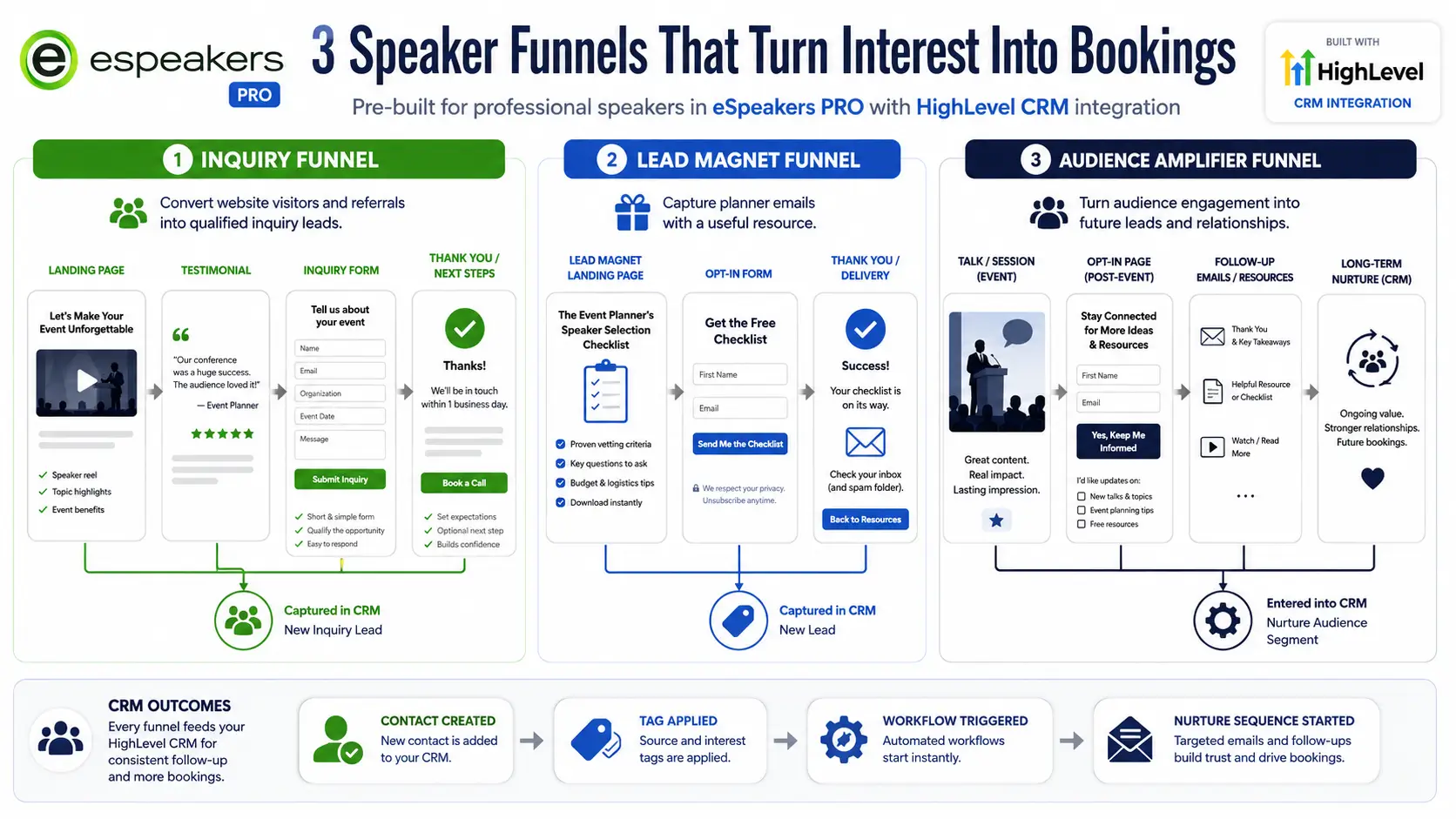
Funnels in HighLevel are multi-page conversion paths that capture leads and feed them directly into your CRM. Unlike a general website, a funnel has one job and one conversion action. Build these two before anything else.
Funnel 1: The Speaker Inquiry Funnel
Purpose: Convert website visitors and referral traffic into qualified inquiry leads with automatic CRM capture.
Page structure:
Page 1, Inquiry Landing Page
- Your positioning statement and value hook above the fold (three sentences maximum)
- A 90-second speaker reel video
- Two or three client logos or association names for immediate credibility
- One strong testimonial from an event organizer
- A short inquiry form: First name, last name, email, phone, organization, event date (approximate), audience size, and a topic interest dropdown that maps directly to your HighLevel contact tags
Page 2, Thank You / Next Steps
- Confirmation that the inquiry was received
- What to expect next (response within one business day)
- A direct link to your eSpeakers profile for additional information
- An option to book a discovery call immediately if they want to move faster
CRM connection: The form submission triggers Workflow 1 (New Inquiry, Instant Response) automatically. The topic interest field applies the appropriate topic tag to the contact record.
Build time: 2–3 hours using HighLevel’s drag-and-drop page builder. Choose the consulting or coaching funnel template as your starting point and customize the copy and branding.
Funnel 2: The Lead Magnet / Authority Funnel
Purpose: Capture planner email addresses with a high-value resource, building your list and warming cold traffic over time.
What to offer: The lead magnet should be useful to a meeting planner who hasn’t booked you yet. Strong options include:
- “The Meeting Planner’s Checklist for Hiring a Keynote Speaker” is a practical tool that positions you as an expert and builds trust without a hard sell.
- “10 Questions to Ask Before Booking a [Your Topic] Keynote Speaker” frames your expertise while helping planners make a better decision
- “Speaker Fee Guide: What Corporate Events Actually Pay for Keynote Speakers in 2026”, High-value, reference document that addresses the most common planner question
Page structure:
Page 1, Lead Magnet Landing Page
- Headline naming the specific resource and its benefit
- Three to five bullet points describing what’s inside
- A two-field form: First name and email only (lowest possible friction)
- One sentence below the form: “You’ll also receive occasional updates from [your name] about speaking availability and event industry insights. Unsubscribe anytime.”
Page 2, Delivery / Thank You Page
- Download link or confirmation of email delivery
- Brief personal note about who you are and what you speak about
- A soft invitation: “If you have an upcoming event where [topic] would be relevant, I’d love to hear about it.” Link to Inquiry Funnel Page 1.
CRM connection: Form submission applies tag source-website and warm-lead, creates a contact record, and triggers the Long-Term Nurture workflow (Workflow 7).
Build time: 1–2 hours. Create the PDF resource first (one to two pages, clean design), then build the two-page funnel around it.
Phase 4: The eSpeakers Integration Layer
Everything built so far lives inside HighLevel. The final configuration step connects it to your eSpeakers profile, creating a unified system where your marketplace presence and your CRM tell the same story in real time. This integration reflects the unified profile approach recommended by PCMA for speakers seeking consistent discovery across multiple planner-facing channels.
Calendar sync
Connect your HighLevel calendar to your eSpeakers availability calendar. When you mark a date as confirmed or held in HighLevel, your public eSpeakers profile updates automatically. Planners browsing the eSpeakers Marketplace see accurate availability without any manual reconciliation on your part.
Inquiry routing
Configure your eSpeakers profile inquiry form to feed directly into your HighLevel CRM. Every planner who submits an inquiry through eSpeakers becomes a contact in HighLevel with the tag source-espeakers applied, is added to your booking pipeline at Stage 1, and triggers Workflow 1. You get an internal notification within minutes.
Pipeline to profile sync
As opportunities move through your booking pipeline, from hold to confirmed, those status updates reflect on your public availability calendar automatically. A planner checking your eSpeakers profile on a Wednesday morning sees the same availability picture you're looking at in HighLevel.
This integration eliminates the most common failure point in speaker calendar management: the gap between internal reality and public-facing availability. With eSpeakers and HighLevel connected, they're always the same.
Maintenance: Keeping the System Clean
A well-built HighLevel setup requires minimal ongoing maintenance, but it does require some. Build these habits into your week:
Monday morning (15 minutes)
Scan your six Smart Lists. Contracts out past five days need a personal follow-up call. Active holds approaching expiration need a check-in. Pre-event engagements without scheduled prep calls need to be scheduled today.
After every event (30 minutes)
Update the pipeline stage to Delivered. Add one personal sentence to the thank-you email template before the workflow fires it. Confirm the testimonial request went out and log the result when it comes back.
Monthly (45 minutes)
Review your long-term nurture sequence performance, open rates, click rates, and replies. If a particular email isn't performing, rewrite the subject line or the content. Review your Smart List for past clients with no contact in 12 months and decide whether to re-tag them for a fresh nurture cycle or move them to Do Not Contact.
Quarterly (90 minutes)
Audit your pipeline for stale opportunities. Anything sitting on a stage for more than 90 days without movement needs a decision: actively pursue, archive, or tag as lost with a reason code. Clean pipelines make everything downstream, reporting, Smart Lists, automation logic, and more reliable.
FAQ
If you follow the phases in order: architecture and tags in 2–3 hours, all seven workflows in 6–8 hours spread across 2–3 days (don’t try to build them all at once), both funnels in 3–4 hours, and eSpeakers integration in 1–2 hours. Total active setup time: 12–18 hours, typically spread over one to two weeks. After that, the system runs itself.
No. Everything described here uses HighLevel’s visual drag-and-drop builders and no-code workflow editor. The technical step with the highest friction is the email domain setup, which requires adding DNS records, which most domain registrars (GoDaddy, Namecheap, etc.) make straightforward with step-by-step guides.
This is why exit triggers matter. Every workflow above includes an exit condition, typically a pipeline stage change, that stops the workflow when the contact’s situation changes. The contract follow-up workflow, for example, checks whether the pipeline stage is still “Contract Out” before each message fires. If the planner signed the contract and you moved the stage forward, the follow-up is never sent. Test every workflow end-to-end before going live.
No. Go live with Workflow 1 (New Inquiry) and Workflow 6 (Post-Event) first; these have the highest immediate ROI. Add the others in priority order: Workflow 3 (Hold), Workflow 4 (Contract Follow-Up), Workflow 2 (Discovery Call), Workflow 5 (Pre-Event), and finally Workflow 7 (Long-Term Nurture). A running system with four workflows is better than a perfectly planned system that isn’t live yet.
Yes. HighLevel’s workflow library includes pre-built “recipes” for common scenarios, appointment reminders, lead follow-up sequences, missed call text-back, and more. These are useful starting points. The speaker-specific workflows above don’t have direct templates, but the logic structure (trigger → wait → condition → action) is the same. Import a similar template and modify the stages, timing, and message content to match the speaker use cases described here.
eSpeakers PRO members have access to pre-configured HighLevel environments with speaker-specific pipelines, workflows, and eSpeakers integration already built in. Rather than building from scratch, you start with a working system and customize the messaging and branding to fit your voice. This is the fastest path from “installed HighLevel” to “fully running speaker CRM with automation.”
You Don’t Have to Build This Alone
The architecture above represents the complete speaker CRM with automation foundation, the exact same structure that high-volume professional speakers use to stay organized, responsive, and visible across their entire contact universe without adding headcount.
It takes time to build. But once it’s running, it runs. The workflows fire at 2 am when a planner submits an inquiry from a different time zone. The hold acknowledgment goes out immediately when you’re mid-flight. The post-event sequence fires within hours of you leaving the stage, regardless of how tired you are.
The system does the work. You do the speaking.
Start your eSpeakers PRO trial, get a pre-built HighLevel setup for speakers →
Skip the blank slate. eSpeakers PRO includes a speaker-configured HighLevel environment with pipeline stages, core workflows, and eSpeakers integration already in place. Customize the messaging, connect your calendar, and go live in days rather than weeks.
Joe Heaps, Chief Marketing Officer at eSpeakers
Joe Heaps is the Chief Marketing Officer at eSpeakers and is responsible for creating and accelerating the company's sales & marketing strategies. He is focused on driving the company's vision of helping organizations and individuals improve in substantial, long-term ways. He believes it happens when the perfect speaker is in front of the right audience. Over 25 years in the industry, Joe’s strategic vision and leadership have propelled eSpeakers to the leading software platform for speakers, coaches, and experts.
Joe Heaps
Chief Marketing Officer, eSpeakers
Latest Articles