The CRM Playbook for Speakers: Automations That Save 10+ Hours a Week
HighLevel CRM automations save professional speakers 10–15 hours per week by eliminating the manual communication tasks that accumulate across every speaking engagement, inquiry acknowledgment, hold confirmation, contract follow-up, pre-event logistics, post-event review requests, long-term nurture, and re-engagement campaigns. Each task takes 5–20 minutes to do manually. Each can be triggered automatically by a pipeline-stage change or a contact's behavior, with no involvement from the speaker.
A speaking business running 25–35 engagements per year carries a significant administrative load that is nearly invisible until you add it up: the inquiry that came in while you were on stage, the hold that expired because follow-up was forgotten, the past client you meant to re-engage before their next planning cycle. Automation handles these tasks consistently, at the moment they need to happen, without the speaker having to remember. This article is the concrete accounting, where the time goes, which automations replace each drain, and what the weekly hours returned look like in practice.

John Doe
Chief Marketing Officer at eSpeakers
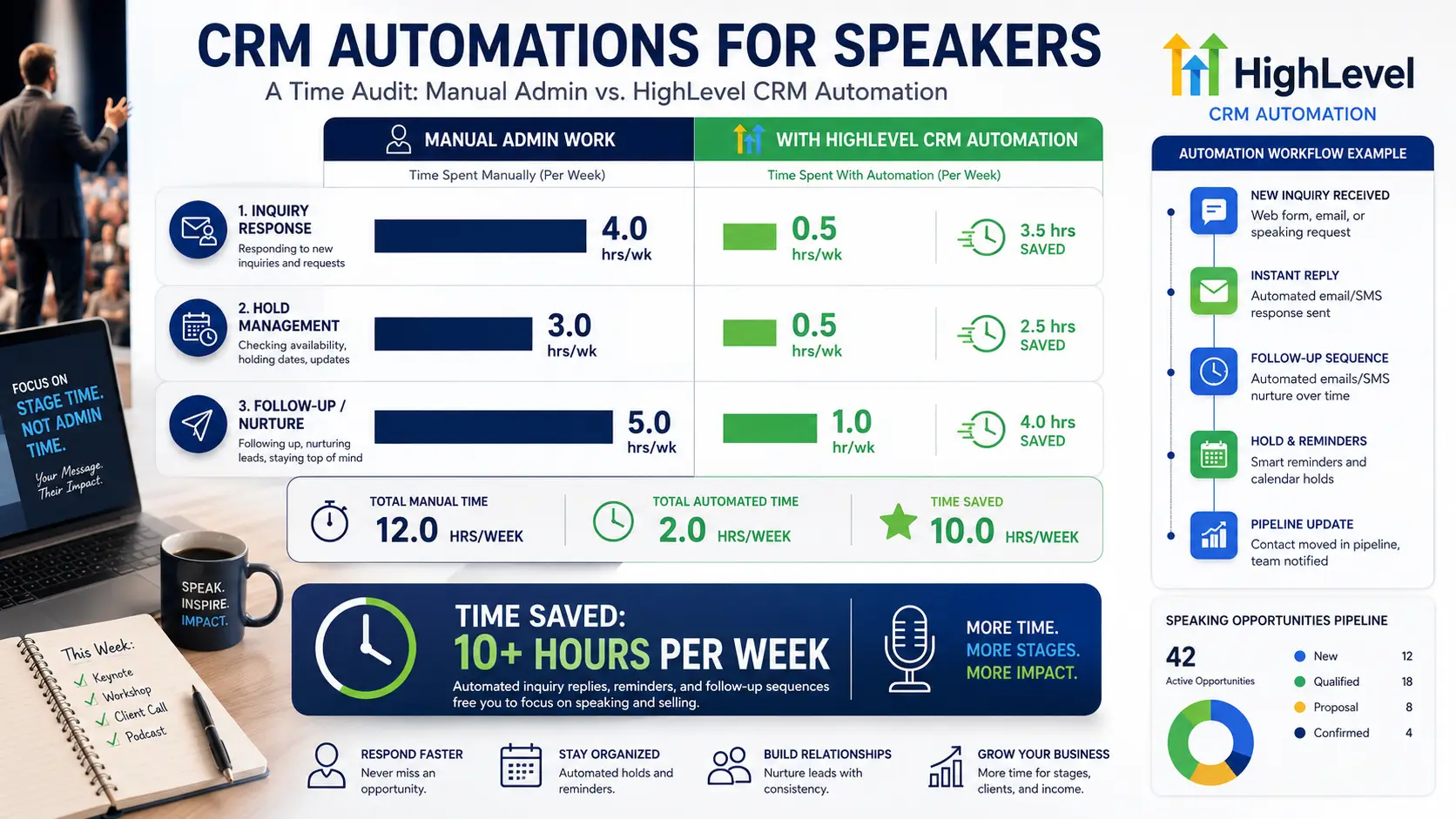
The Speaker Admin Audit: Where Your Time Actually Goes
Before building automations, you need to see the problem clearly. Most speakers underestimate their admin overhead by 30–50% because the tasks feel small individually. They're not small, they're continuous.
Here is a realistic accounting of weekly administrative time for a speaker doing 25–35 engagements per year, based on the typical touchpoints across a booking lifecycle:
| Task | Manual Time (per occurrence) | Frequency (per week) | Weekly Total |
| Responding to new inquiries | 15–20 min each | 3–5 | 45–100 min |
| Availability check and calendar review | 10 min each | 3–5 | 30–50 min |
| Sending and documenting hold confirmations | 20 min each | 1–2 | 20–40 min |
| Contract creation, personalization, and sending | 30–45 min each | 1 | 30–45 min |
| Contract follow-up (unsigned after 5 days) | 10 min each | 1–2 | 10–20 min |
| Deposit tracking and invoice follow-up | 15 min each | 2–3 | 30–45 min |
| AV/tech requirements checklist to the event team | 15 min each | 1–2 | 15–30 min |
| Scheduling and confirming prep calls | 20 min each | 2–3 | 40–60 min |
| Pre-event confirmation emails | 15 min each | 2–3 | 30–45 min |
| Post-event thank-you emails | 20 min each | 1–2 | 20–40 min |
| Testimonial request emails | 10 min each | 1–2 | 10–20 min |
| Past client re-engagement outreach | 20 min each | 2–3 | 40–60 min |
| Email newsletter/nurture campaign writing | 60–90 min | 1x/month (~15 min/wk avg) | 15 min |
| CRM data entry and contact updates | 5–10 min each | 5–8 | 25–80 min |
| Total estimated weekly admin time | ~5.75 – 12.25 hours |
At the midpoint, that's roughly eight to nine hours per week, more than a full working day, spent on tasks that are largely templatable, predictable, and repeatable. Every one of them is a candidate for automation.
The research is consistent on what happens when these tasks are systematized: automation typically recovers five to ten hours per week for service-based businesses, and implementations with advanced workflows consistently report fifteen or more hours saved. The HighLevel blog documents cases where users report 15–20 hours weekly recovered from administrative workflows, and that's before adding AI features like Conversation AI and Voice AI.
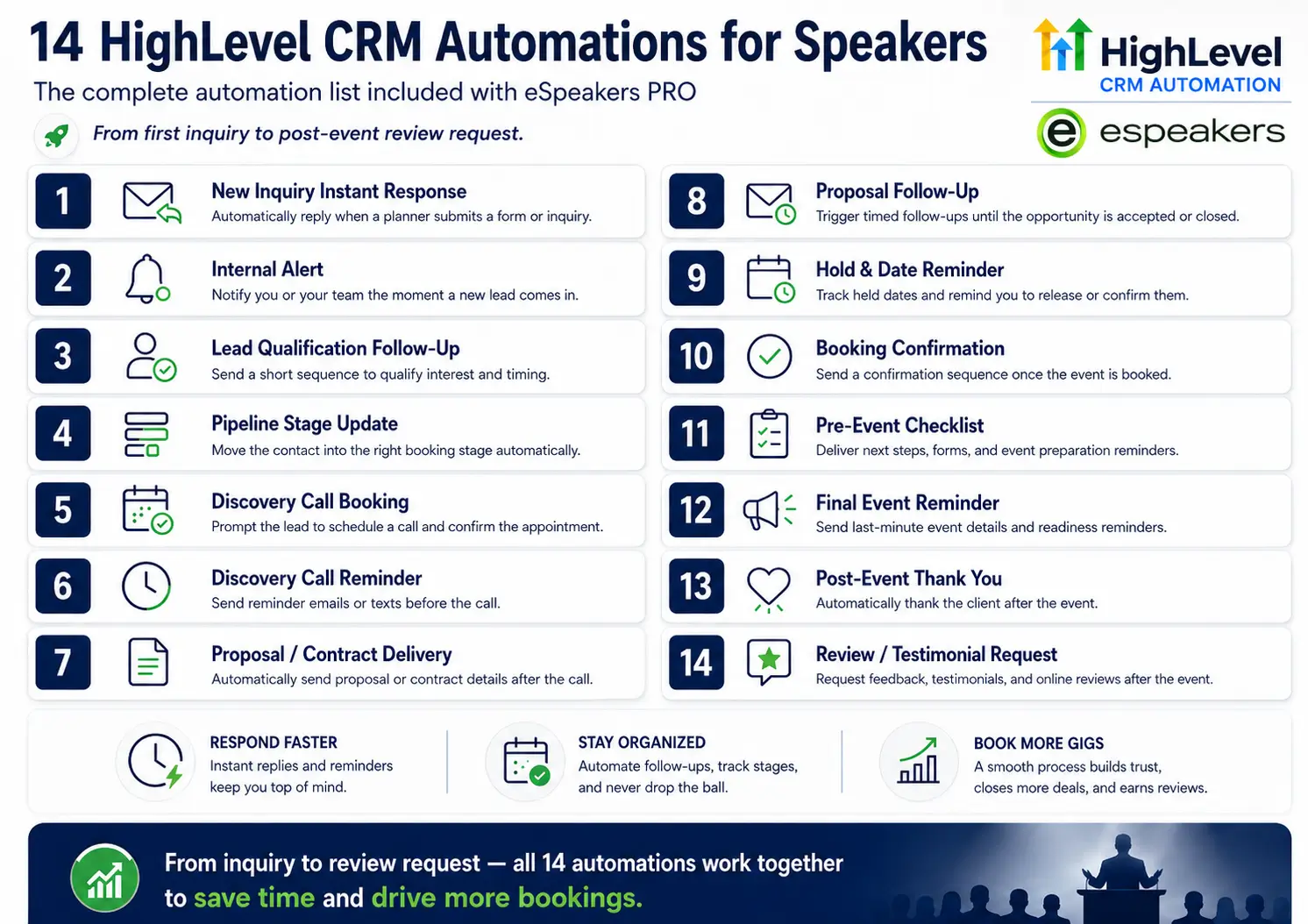
The following fourteen automations are the specific ones that account for the bulk of that recovery in a speaking business.
The 14 Speaker CRM Automations That Return Your Week to You
Automation 1: Instant Inquiry Response
Time it replaces
15–20 minutes per inquiry, 3–5 times per week = up to 100 minutes weekly.
The manual version
You notice the inquiry, open it, check your calendar, compose a professional acknowledgment, attach your speaker profile or bio, and send. When you're traveling or on stage, this takes hours to happen, and every hour a planner waits increases the probability they've moved on.
The automation
Trigger = new inquiry form submitted (eSpeakers profile, website, or any landing page). Within two to five minutes: (1) contact record created in HighLevel, (2) personalized acknowledgment SMS fires with your name and a link to your eSpeakers profile, (3) acknowledgment email fires with your bio, speaker page link, and availability calendar, (4) internal notification pushed to your phone. Pipeline stage moves to "New Inquiry" automatically.
Time recovered
90–100 minutes per week. More importantly, a planner receives a professional, personalized response within minutes, regardless of what you're doing, from anywhere in the world.
Automation 2: Discovery Call Confirmation and Reminder Sequence
Time it replaces
20 minutes per booking for confirmation + 5 minutes per reminder × 2 reminders = ~30 minutes per call, 2–3 calls per week = 60–90 minutes weekly
The manual version
The call gets booked, you send a confirmation email, then remember to send a reminder the day before, then hope you remembered. No-shows are common and frustrating when you've prepared for a call.
Time it replaces
Trigger = appointment booked in HighLevel calendar (discovery call event type). Immediate: confirmation email with call link and a three-question pre-call form. 24 hours before: SMS reminder with link. 1 hour before: final SMS reminder. If the call is canceled, the rescheduling workflow fires automatically with two available times drawn from your live calendar.
Time recovered
60–90 minutes per week. No-show rates also drop significantly with automated reminders; industry data shows reminder sequences reduce no-shows by 30–50%.
Automation 3: Hold Confirmation and Expiry Management
Time it replaces
20 minutes per hold confirmation + 10 minutes per follow-up × 1–2 holds per week = 30–60 minutes weekly
The manual version
A planner asks you to hold a date. You tell them verbally or by email, make a note somewhere, and hope you both remember the terms. The hold expires unchecked, and you've turned down other inquiries for a date that evaporated quietly.
The automation
Trigger = pipeline stage changes to "Hold Confirmed." Immediate: pre-written hold acknowledgment email fires with the date, the expiry window (you set this as a custom field), and a confirmation of next steps. Day 7 of a 14-day hold: check-in email fires automatically. Two days before expiry: SMS fires with a gentle nudge. If the hold is not converted by expiration, internal notification prompts a personal call.
Time recovered
30–60 minutes per week, plus the invisible cost of lost revenue from holds that expired unmanaged.
Automation 4: Contract Dispatch and Follow-Up
Time it replaces
30–45 minutes per contract creation + 10 minutes per follow-up = 40–55 minutes per booking, once or twice a week = 40–110 minutes weekly.
The manual version
You agree verbally, then spend 30 minutes personalizing a contract template, sending it for signature, waiting, following up manually five days later when you notice it's still unsigned, waiting again.
The automation
A standard contract template lives in HighLevel (or your connected e-signature tool). When a pipeline stage changes to "Proposal Accepted," a task fires for you to review and send the personalized contract. This review takes five minutes, not thirty. Once sent, the pipeline moves to "Contract Out." After five business days without a status change, an automated follow-up email fires: "Following up on the contract, happy to answer any questions before you sign." After another three days, an internal notification prompts a personal call rather than another automated message.
Time recovered
35–95 minutes per week. The contract review step remains human (important for quality control), but everything around it is handled.
Automation 5: Deposit and Invoice Tracking
Time it replaces
15 minutes per invoice + 10 minutes per reminder × 2–3 outstanding invoices per week = 50–75 minutes weekly
The manual version
You send an invoice, track it in a spreadsheet, remember to follow up when it's overdue, draft a polite but firm reminder, send it, track it again. For speakers managing 25+ engagements per year, this is constant background noise.
The automation
HighLevel's built-in invoicing and payment system (or connected Stripe integration) triggers a workflow when an invoice is sent. If the invoice is unpaid after seven days, a payment reminder email fires automatically. If still unpaid after fourteen days, an SMS is fired. If unpaid after twenty-one days, an internal notification prompts a personal call. When payment is received, the pipeline stage updates automatically, and the reminder sequence stops.
Time recovered
50–75 minutes per week. Cash flow also improves, and automated reminders consistently produce faster payments than manual follow-up because they're timely and consistent rather than sporadic.
Automation 6: Pre-Event Preparation Checklist
Time it replaces: 15–20 minutes per AV checklist + 20 minutes per prep call scheduling × 1–2 active engagements per week = 35–80 minutes weekly
The manual version: You remember to send the AV requirements at some point. You follow up with the event coordinator to schedule the prep call. Some of it gets done. Some of it gets done late. Occasionally, it gets missed entirely, and you’re briefing a venue coordinator by phone from a hotel lobby the night before the event.
The automation: Trigger = pipeline stage changes to “Deposit Received” (confirmed booking). Within 48 hours: AV and technical requirements email fires automatically to the event contact, drawn from a pre-written template. Simultaneously: internal task created, “Schedule prep call with [organizer name], due in 7 days.” Fourteen days before the event date: pre-event brief request fires, asking the organizer for audience demographics, key messages, and any sensitivities. Three days before the event: final confirmation email fires with logistics, arrival time, and green room details.
Time recovered: 35–80 minutes per week per active engagement. Every engagement runs through the same consistent pre-event process, which also reduces the number of last-minute calls from event organizers who didn’t get their logistics questions answered.
Automation 7: Post-Event Thank-You and Testimonial Request
Time it replaces: 20 minutes per thank-you + 10 minutes per testimonial request × 1–2 events per week = 30–60 minutes weekly
The manual version: You come off stage exhausted, travel home, and try to remember to send a thank-you before too much time passes. The testimonial request happens when you remember it, usually too late, when the organizer’s experience has faded. Response rates for testimonial requests sent more than a week after an event are a fraction of those sent within 48 hours.
The automation: Trigger = pipeline stage changes to “Delivered.” Within 24 hours: a workflow task fires for you to personalize and send the thank-you email, the template is pre-written, you insert one specific detail, and send it in under two minutes. Within 48 hours: the testimonial request email fires automatically, brief, specific, low-friction. “Would you share a sentence or two about how the session landed? A reply to this email is perfect.” Within 72 hours: if the testimonial hasn’t been received, a gentle SMS follow-up fires. When a testimonial is received, the tag testimonial-received is applied, stopping further follow-up.
Time recovered: 30–60 minutes per week, plus a dramatically higher testimonial capture rate, the 48-hour window captures organizers while the event is vivid.
Automation 8: Final Invoice and Balance Collection
Time it replaces: 15 minutes per invoice send + tracking overhead × 1–2 completions per week = 15–30 minutes weekly
The manual version: Event is done, final payment is owed, you manually generate the balance invoice, send it, track it, and follow up if needed. In the chaos of post-event recovery and travel, this sometimes slips a week.
The automation: When the pipeline stage changes to “Delivered,” a task fires immediately: “Send final invoice to [contact name], due today.” If you’re using HighLevel’s invoicing, you can connect this to an automatic invoice trigger. Payment reminder sequence runs as described in Automation 5 above.
Time recovered: 15–30 minutes per week, plus faster cash collection.
Automation 9: Long-Term Nurture Sequence (Set Once, Runs Forever)
Time it replaces: Ongoing relationship management for hundreds of contacts, impossible to do manually at any meaningful scale
The manual version: You think about staying in touch with past clients and warm leads. You send occasional emails when you remember. Some contacts hear from you twice a year; others haven’t heard from you in three years, even though they’d happily rebook you.
The automation: When a contact receives the tag warm-lead or past-client, they enter a 12-month nurture sequence in HighLevel: value-based content emails at months 1, 2, 4, and 7; a soft availability check-in at months 3 and 6; a direct re-engagement pitch at month 10; an internal notification at month 12 to follow up personally with anyone who hasn’t responded. The sequence runs on autopilot, treating each contact individually based on their tag and activity.
Time recovered: Not measured in minutes per week but in bookings per year. A speaker with 150 past clients and warm leads running a 12-month nurture sequence generates conversations they would never have initiated manually. Each conversation that converts to a booking represents $7,500–$25,000 in revenue from a relationship that was already warm.
Automation 10: Missed Inquiry Recovery
Time it replaces: The cost of missed inquiries that came in while you were on stage or in transit.t
The manual version: An inquiry comes in at 7 PM on a Tuesday when you’re in a cab from the airport. You notice it on Wednesday morning. By then, the planner has moved on.
The automation: Your eSpeakers inquiry form, website contact form, and any chat widget on your site all feed into HighLevel’s unified inbox. Conversation AI (HighLevel’s AI chat feature) can handle the initial response, answering common questions about availability, topics, and fees, and inviting the planner to book a discovery call, around the clock, in a tone and voice you configure. Every conversation is logged in your CRM. You review it in the morning and pick up the thread where needed.
Time recovered: Not hours recovered, but bookings recovered. An inquiry that gets a response within five minutes converts at a dramatically higher rate than one that waits eighteen hours.
Automation 11: Bureau Agent Quarterly Update
Time it replaces: 20–30 minutes per bureau contact per quarter × the number of bureau relationships you maintain. IASB member standards expect speakers to maintain regular, proactive communication with bureau agents — automated sequences make this professional obligation sustainable at scale.
The manual version: You mean to stay in touch with bureau agents. You send an occasional email when something notable happens. Most of your bureau relationships gradually cool because you’re not top of mind when agents are building shortlists for client events.
The automation: Bureau contacts are tagged bureau-agent and vip in your CRM. MPI research on speaker sourcing shows that agents who receive timely, relevant updates from speakers book them more frequently, making bureau nurture automation one of the highest-ROI workflows in a speaker’s CRM. A quarterly broadcast email fires to this Smart List, automatically, on a schedule, with your current availability windows, any new topics or certifications, and a brief summary of recent notable engagements. The email is templated but includes personalization tokens (first name, last contact date) and reads as a direct communication, not a newsletter blast. Takes 15 minutes to write once per quarter; the distribution is automatic.
Time recovered: The hours you don’t spend maintaining bureau relationships manually, plus the incremental bookings generated by staying visible to agents who are actively pitching clients.
Automation 12: Referral Activation Sequence
Time it replaces: 20–30 minutes per referral request × however many warm contacts you should be asking.
The manual version: You know you should ask happy clients and colleagues for referrals more systematically. You don’t, because it feels awkward and you forget.
The automation: When you apply the tag referral-request to a contact, a two-touch sequence fires automatically: a brief, genuine referral ask email with your one-sheet attached, followed by a soft follow-up fourteen days later. The sequence stops the moment any reply is received, routing to a personal conversation. You batch-tag contacts for referral requests monthly, ten contacts, five minutes, and the sequence does the rest.
Time recovered: Minimal direct time, but systematic referral activation generates a higher volume of warm introductions than the occasional organic referral, directly impacting the booking pipeline.
Automation 13: Speaker Profile Sync and Availability Management
Time it replaces: 10–15 minutes per calendar update × multiple times per week = 20–45 minutes weekly.
The manual version: You confirm a new booking. You update your eSpeakers profile. You update your website calendar. You update your personal Google Calendar. Any of these that don’t get updated immediately creates incorrect information for planners checking availability.
The automation: Your HighLevel calendar syncs bidirectionally with your eSpeakers profile and your personal calendar (Google or Outlook). When you move a pipeline stage to “Deposit Received” and mark the date as confirmed in HighLevel, your eSpeakers availability updates automatically. No manual reconciliation. No stale data.
Time recovered: 20–45 minutes per week, plus the elimination of the embarrassing situation where a planner asks about a date your calendar shows as available, but you already confirmed it elsewhere.
Automation 14: Re-Engagement of Lost Inquiries
Time it replaces: Hours of lost revenue from inquiries that didn’t convert the first time and were never followed up on
The manual version: A planner reaches out, you have a conversation, and they go quiet. You’re not sure if they moved on, if the event got canceled, or if they’re still deciding. You don’t follow up because you’re not sure what to say, and the inquiry is buried in your inbox.
The automation: Any contact that enters your pipeline and doesn’t progress past “New Inquiry” or “Proposal Sent” within thirty days gets tagged lost-or-stalled automatically (triggered by a time-based workflow condition: no pipeline movement in thirty days). This tag triggers a single, low-pressure re-engagement email: “Hi [name], I wanted to circle back on our conversation about [event]. I don’t want to assume the timing has passed. If it’s still in the works and a speaking component makes sense, I’m happy to reconnect.” One touch. No pressure. This email alone recovers bookings from inquiries that went cold simply because neither party circled back.
Time recovered: Minimal active time; significant revenue recovery. Industry research shows that 80% of sales require at least five follow-ups, yet most speakers never send a second touch to cold inquiries.
The Cumulative Math: What 10+ Hours a Week Actually Looks Like
Let's total the time recovery from the automations above, conservatively:
Automation | Weekly Time Recovered |
Instant inquiry response | 60–90 min |
Discovery call confirmation + reminders | 45–60 min |
Hold confirmation and follow-up | 30–45 min |
Contract dispatch and follow-up | 30–60 min |
Invoice tracking and reminders | 30–45 min |
Pre-event checklist sequence | 30–60 min |
Post-event thank-you + testimonial request | 25–45 min |
Final invoice and collection | 15–20 min |
CRM data entry (automated capture) | 20–40 min |
Calendar sync (no manual reconciliation) | 15–30 min |
Conservative weekly total | ~5.5 – 9.25 hours |
That's before adding the time freed by Automation 9 (nurture), Automation 11 (bureau), Automation 12 (referral), and Automation 14 (re-engagement), which don't have direct per-week time equivalents but represent ongoing relationship management that was simply not happening manually.
The honest answer to "how much time does HighLevel speaker CRM automation save?" is: it depends on your volume. For a speaker doing 20 engagements per year, the recovery is probably five to seven hours per week. For a speaker doing 40+ engagements, it's closer to twelve to fifteen. For a speaker with a VA managing the system, the recovered time goes directly into business development and content rather than admin.
At any volume, ten hours per week is a realistic minimum, and that number compounds. Ten hours per week is 520 hours per year. At $250/hour opportunity cost (a conservative estimate for a professional speaker), that's $130,000 in recovered capacity annually. The question isn't whether the automation is worth building. The question is why it hasn't been built yet.
The One Automation to Build First
If you're new to HighLevel and the list above feels overwhelming, start here: the instant inquiry response.
It requires: an inquiry form on your eSpeakers profile or website connected to HighLevel, a single acknowledgment email template, an acknowledgment SMS template, and a three-step workflow (trigger → send SMS → send email → internal notification).
Build time: 45 minutes for a first-timer.
Why start here: it's the automation with the most immediate, visible ROI. The next time an inquiry comes in at 11 PM when you're asleep, your HighLevel system sends a professional, personalized response within five minutes. You see the notification in the morning, the planner has your profile in their inbox, and the conversation is already warm before you type your first word.
That experience, watching your CRM handle a planner interaction while you slept, is what turns skeptics into believers. Once you see it work, every other automation on this list becomes obvious.
FAQ
The 10-hour figure is conservative for speakers doing 20+ engagements per year. Even at 15 engagements per year, the inquiry response, hold management, pre-event sequence, and post-event follow-up automations alone recover four to five hours weekly. The nurture and re-engagement automations, which run silently in the background on your full database, don’t add recoverable weekly hours but add significant annual revenue from relationships that were previously unmanaged.
Spread across two weeks of focused sessions, each taking one to three hours, the full suite takes approximately twelve to eighteen hours of setup time. Most speakers build them in phases: start with the five highest-priority automations (inquiry response, contract follow-up, post-event sequence, hold management, nurture), get them running, and add the rest over the following month. The eSpeakers PRO environment includes pre-configured versions of most of these workflows, which reduces setup time significantly.
This is the most common concern, and it’s addressable. HighLevel’s personalization tokens (first name, organization name, event date, topic) make automated messages feel direct rather than broadcast. The goal is never to hide that you use automation; it’s to ensure every planner receives timely, professional communication that reflects your brand consistently. The handful of touchpoints that genuinely require a personal voice (the post-event thank-you, the bureau agent relationship email) are flagged as tasks requiring your personal attention before they fire. This aligns with NSA’s professional conduct guidelines, which recognize automated business communications as standard practice while emphasizing personal accountability in client relationships.
Absolutely, and your VA becomes dramatically more effective with HighLevel. Instead of managing seven separate tools (calendar, email, CRM, invoicing, etc.) with constant context-switching, your VA works from a single dashboard where all contacts, communications, pipeline stages, and tasks live in one place. Handoffs are cleaner. Nothing falls through the gaps between systems. Your VA’s capacity increases while the work output stays the same or improves.
They replace only the repetitive parts. The discovery call, the proposal conversation, the prep call, the event itself, the personal thank-you, none of that is automated. What’s automated is everything that happens between those human moments: the acknowledgment, the reminder, the hold documentation, the contract follow-up, and the invoice sequence. The automation clears the path for the relationship to happen. It doesn’t replace the relationship.
HighLevel’s reporting dashboard tracks everything: email open rates by campaign, workflow completion rates, pipeline conversion rates by stage, and response times. Set a monthly calendar reminder to review these metrics. If a workflow has a low completion rate (many contacts exiting before the end), the trigger might be misconfigured, or the content might be prompting unsubscribes. If a workflow has a high completion rate but low conversion (contacts going through the sequence without moving pipeline stages), the messaging may need adjustment. The data is there, the work is reading it and iterating.
The Real Cost of Not Automating
There’s a quieter argument for speaker CRM automation that goes beyond the hours.
Every administrative task you handle manually is a task that requires your attention, which means it competes for headspace with your content, your preparation, your relationships, and your creative work. Admin doesn’t just steal time. It creates context-switching costs, interrupted focus, and the subtle psychological weight of knowing there are things you haven’t done yet.
A speaker managing fifteen simultaneous engagement touchpoints manually, holds to follow up on, contracts awaiting signature, testimonials to request, prep calls to schedule, and invoices to chase, is a speaker who sits down to write their next keynote with a full background queue of unresolved tasks. That’s not the environment that produces great work.
Automation clears the queue. Not because the tasks disappear, but because they’re handled by a system that doesn’t need your attention to run. The hold gets acknowledged. The contract reminder fires. The testimonial request goes out. The invoice follows up. All of it happens without requiring you to hold it in your head.
What’s left is the work that actually requires you.
Start your eSpeakers PRO trial, get HighLevel CRM configured for speakers from day one →
eSpeakers PRO includes a speaker-configured HighLevel environment with pre-built versions of the core workflows in this article, inquiry response, hold management, pre-event sequence, post-event follow-up, and nurture. Import, customize your messaging, connect your calendar, and your automation system is live in a day rather than a month.
Joe Heaps, Chief Marketing Officer at eSpeakers
Joe Heaps is the Chief Marketing Officer at eSpeakers and is responsible for creating and accelerating the company's sales & marketing strategies. He is focused on driving the company's vision of helping organizations and individuals improve in substantial, long-term ways. He believes it happens when the perfect speaker is in front of the right audience. Over 25 years in the industry, Joe’s strategic vision and leadership have propelled eSpeakers to the leading software platform for speakers, coaches, and experts.
Joe Heaps
Chief Marketing Officer, eSpeakers
Latest Articles