The Speaker Calendar System: How the Pros Organize, Manage, and Scale Their BusinessThe Speaker Calendar System: How the Pros Organize, Manage, and Scale Their Business
A professional speaker's calendar system should do five things at once: track confirmed bookings, manage active holds with expiration reminders, sync live availability to public directory profiles, connect to client records and CRM workflows, and trigger the automated follow-up sequences that convert inquiries into signed contracts. Most speakers' calendars do one of these things, and the gap between one and five is where bookings fall through the cracks.
The speakers who consistently fill their calendars aren't necessarily better on stage than the ones who struggle. They're better operators. They've built a system where every moving part of a speaking engagement has a defined home, and nothing advances or stalls based on whether they remembered to check their phone. This article breaks down exactly how to build that system:
- The three distinct calendar layers professional speakers maintain
- The tools that power them
- The workflows that connect them
- The discipline that separates a speaker who's always scrambling from one who always knows what's coming next.

John Doe
Chief Marketing Officer at eSpeakers
Why Your Calendar Is Your Most Important Business Asset
Before getting into systems, it’s worth reframing what a speaker’s calendar actually is.
For most people, a calendar is used to track time. For a professional speaker, a calendar does five distinct jobs simultaneously:
It’s your revenue pipeline. Every confirmed date is revenue. Every hold is potential revenue. Every open date is an opportunity. A speaker who doesn’t have clear visibility into their pipeline, what’s confirmed, what’s pending, and what’s available is running their business blind.
It’s a planner-facing sales tool. When a meeting planner asks, “Are you available on October 14th?” they need an answer in minutes, not hours. Speakers who can respond with real-time calendar visibility close more bookings than speakers who say, “let me check and get back to you.” Most companies book their keynote speakers four to six months before the event date, and in a compressed timeline market, responsiveness is itself a differentiator.
It’s your travel and logistics hub. A speaking engagement isn’t just a two-hour keynote. It’s travel the day before, a prep call the week before, a post-event debrief, an invoice to follow up on, and a testimonial request to send within 48 hours. If none of that is on your calendar, some of it won’t happen.
It’s your capacity management system. How many engagements can you take in a month before your prep quality suffers? How many travel days can you absorb before you burn out? A well-managed calendar answers those questions before you overcommit.
It’s your business intelligence. How many new engagements did you book this quarter versus last? What percentage of holds converted to confirmed dates? Which months are consistently light, and why? Your calendar data, tracked properly, tells the story of your business.
Most speakers use their calendar for job number one, occasionally for job three, and not at all for jobs two, four, and five. That’s the gap this article closes.
The Three Calendars Every Speaker Needs
The mistake most speakers make is trying to run everything off a single calendar. The result is a cluttered, hard-to-read mess that makes it nearly impossible to answer a planner's availability question quickly or see the state of the business at a glance.
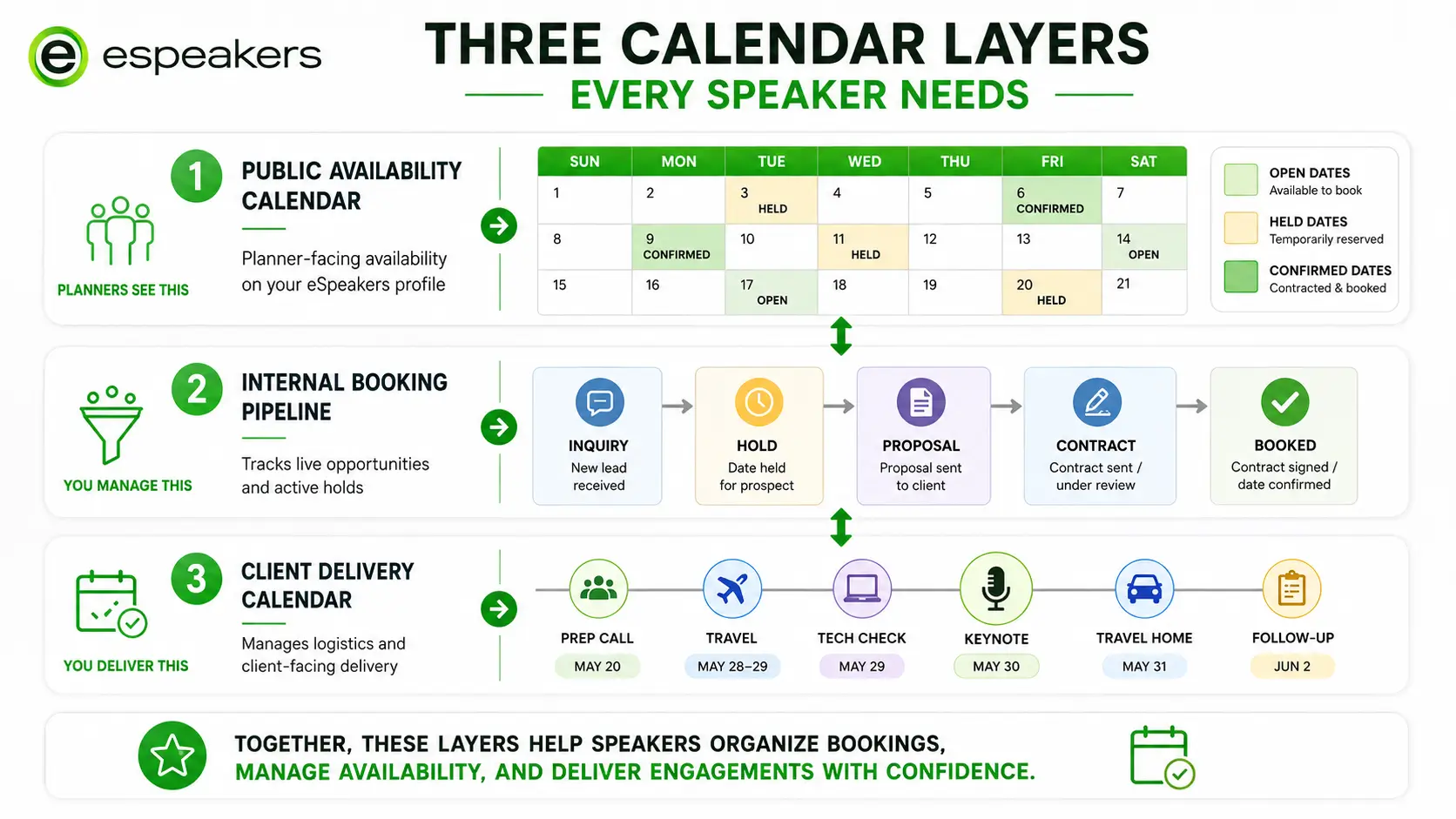
Professional speakers who scale their businesses typically maintain three distinct calendar layers, either as separate calendars within one system or as separate views.
The Public Availability Calendar
This is the calendar a meeting planner sees. It shows open dates, held dates, and confirmed engagements, nothing else. No dentist appointments, no personal travel, no family commitments. Its job is to give planners instant confidence that you manage your business professionally and that they can trust your availability information.
This calendar lives on your eSpeakers profile and ideally syncs in real time with your master calendar so it’s never manually updated. When a planner clicks “check availability” on your profile page and sees a clean, current calendar, the friction of the first booking step disappears entirely.
The Master Operations Calendar
This is the calendar you work from every day. It contains everything: confirmed engagements and their travel windows, prep call blocks, writing and rehearsal time, personal commitments, buffer days you’ve intentionally protected, and any administrative blocks (invoicing, follow-up, business development).
The master calendar is where you make the actual decisions about your time. When a planner asks about a specific date, you check the master calendar first, then update the public calendar accordingly.
The Engagement Pipeline Calendar
This is the calendar most speakers don’t have, and its absence is one of the most common reasons good inquiries go cold. The pipeline calendar tracks every inbound inquiry that hasn’t yet converted to a confirmed booking: holds, tentatives, proposals sent, follow-ups due, and contracts out for signature.
It answers the question: What is happening right now that I need to act on? A hold that expires unfollowed up is a booking lost. A proposal sent two weeks ago with no follow-up is a planner who found someone else. The pipeline calendar keeps these live opportunities visible so none of them slip through.
The Speaking Engagement Lifecycle, and Where Most Speakers Lose Control
Every speaking engagement moves through the same stages from first contact to final invoice. The speakers who scale their businesses have a defined workflow for each stage. The speakers who stay stuck are usually missing workflows at the same two or three points.
Stage 1: Inquiry
A planner makes first contact by email, through your eSpeakers profile, via a referral, or by phone. At this point, your calendar has one job: give the planner an availability answer quickly.
What the pros do: They have a direct link to their eSpeakers availability calendar in their email signature, on their website, and as a one-tap option from their profile. When a planner asks about a date, they can check and respond within minutes, not because they’re glued to their inbox, but because the system makes it easy.
Where most speakers lose it: They treat the inquiry as a casual conversation and don’t formalize anything. No calendar note, no CRM entry, no follow-up scheduled. Three weeks later, they’ve forgotten the conversation, and the planner has booked someone else.
The fix: Every inquiry gets a CRM entry and a calendar note the moment it comes in, even before you’ve confirmed interest. Your HighLevel CRM pipeline should have an “Inquiry” stage that captures every new contact automatically.
Stage 2: Soft Hold
A planner is interested and asks you to hold a date while they finalize their decision. This is a critical transition point that most speakers handle too casually.
A hold is not a booking. It’s also nothing. It’s a legitimate claim on your calendar that deserves a formal acknowledgment, a documented expiration date, and a follow-up sequence.
What the pros do: They acknowledge holds in writing immediately, a brief confirmation email that names the date, the event, and the expiration window (typically 7–14 days, depending on the timeline). They block the date on both their master calendar and their public availability calendar. They set a follow-up reminder in their CRM for the midpoint of the hold window.
Where most speakers lose it: They verbally agree to a hold and don’t document it. The date sits in limbo, they turn down other inquiries for that date, and when the hold expires without response, they’ve lost revenue on both ends, the hold that didn’t convert and the inquiry they declined.
The fix: Have a hold confirmation email template ready to send within 30 minutes of any verbal hold agreement. Document the expiry date explicitly. Automate a follow-up reminder in HighLevel CRM so the ball never sits in your court without a next action.
Stage 3: Contract and Deposit
The planner confirms, and the booking moves to contract. This is where the administrative workload spikes, and where speakers with inadequate systems start dropping the ball.
A contract for a speaking engagement needs to address at minimum: the event date and location, your fee, travel and accommodation arrangements, recording and intellectual property rights, cancellation and postponement terms, payment schedule (typically 50% deposit to hold the date, balance 30 days before the event), and any customization or prep call requirements.
What the pros do: They use a standard contract template that can be sent via electronic signature (DocuSign or a similar platform) the same day the verbal agreement is made. The deposit invoice is sent simultaneously. Neither prep work nor travel booking begins until both the signed contract and deposit are received.
Where most speakers lose it: They delay sending the contract because “it feels awkward” or because they’re traveling. Every day between verbal agreement and a signed contract is a day the booking can evaporate. Delayed contracts also send a subtle signal to planners that working with you might be disorganized.
The fix: Your contract template should be pre-built, pre-approved, and ready to personalize in under 10 minutes. Set a calendar reminder: if a signed contract isn’t returned within five business days of sending, follow up directly, not by email, but by phone.
Stage 4: Pre-Event Preparation
Between contract signing and event day, there’s a defined sequence of activities that every professional speaker handles. The difference between good and great speakers, from a planner’s perspective, is often not what happens on stage but how smoothly this pre-event window goes.
The typical pre-event process includes several key steps:
- Discovery Call: This initial conversation helps to understand the audience and the goals of the event.
- Customization Phase: During this stage, you adapt your content to meet the specific needs of the audience.
- Technical Requirements Checklist: An AV and technical requirements checklist is sent to the event team to ensure everything is in place.
- Travel and Accommodation Bookings: This involves arranging transportation and lodging for the event.
- Final Prep Call: A final preparation call is scheduled 48 to 72 hours before the event to confirm all details.
What the pros do: Each of these activities is templated and calendared the moment the contract is signed. They use a pre-event checklist, either in their CRM or their project management system, that ensures nothing gets missed, regardless of how many engagements are running simultaneously. Contracts specify which steps require client input and when, so prep calls don’t get scheduled at the last minute.
Where most speakers lose it: They wing the pre-event process when they’re only doing a few engagements a year. When volume increases, “winging it” becomes a reliability risk. Planners who have to chase a speaker for AV requirements or can’t get prep call availability confirmed are planners who don’t rebook.
The fix: Build one pre-event checklist and attach it to every new engagement in your CRM. Every item gets a due date and an owner (you, your VA, or the event organizer). Nothing lives in your head.
Stage 5: Post-Event Follow-Up
The engagement isn’t over when you leave the stage. The 72-hour window after an event is the highest-value time in your business development cycle, and most speakers squander it.
What the pros do: Within 24 hours, send a thank-you email to the event organizer. Within 48 hours: send the testimonial request (specific, brief, low-friction). Within 72 hours: send the final invoice if any balance remains. Within one week: send a personalized follow-up to any attendees who expressed interest in future work. Within 30 days: add the event to your client history in CRM and log the testimonial if received.
Where most speakers lose it: They decompress after the event (understandably) and let the follow-up window close. A testimonial requested six weeks later gets a fraction of the response rate of one requested within 48 hours. A planner who loved your performance but heard nothing from you afterward won’t think of you first for next year’s event.
The fix: Your post-event sequence should be automated in HighLevel CRM, triggered by a status change from “Delivered” to “Post-Event” in your pipeline. You write the emails once, the system sends them at the right time, and you personalize where it matters.
Choosing the Right Speaker Calendar Software
The calendar software question is one of the most common ones in the speaking community, and the answer is less about which platform and more about what the platform needs to do.
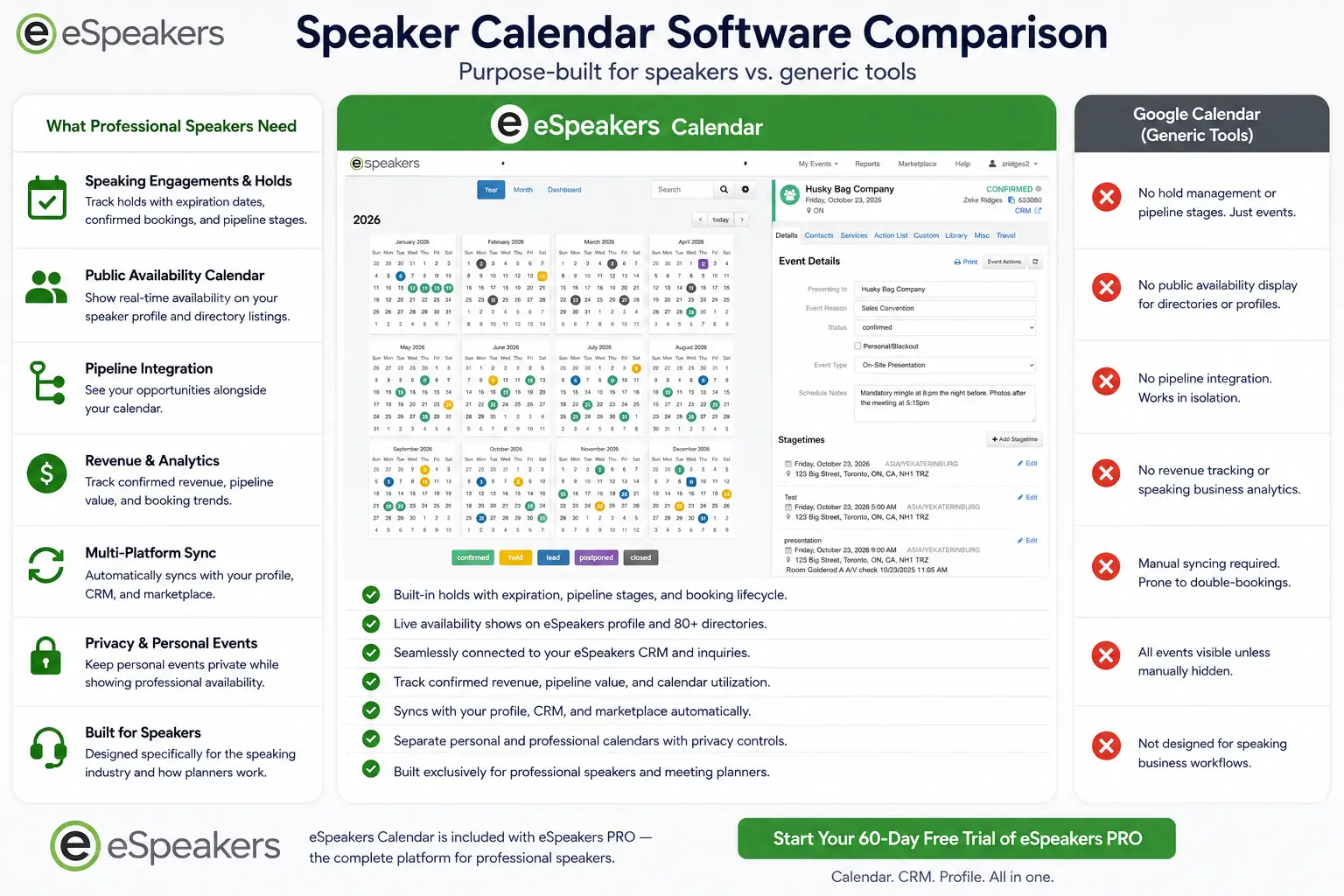
The right speaker calendar software should handle four things:
Real-time availability display
Planners need to see your current availability without emailing you first. This means your calendar must sync with your public eSpeakers profile so that when you mark a date as confirmed or held, it updates automatically. Manual updates are a maintenance burden that eventually fails.
Multi-calendar management
You need to maintain separate views for public availability, personal commitments, and pipeline without those layers bleeding into each other. Look for software that supports multiple calendar layers with distinct visibility settings.
CRM integration
Your eSpeakers calendar and your CRM should talk to each other. When a new booking is confirmed in HighLevel CRM, the date should appear on your operations calendar automatically. When you update a hold to confirmed, your CRM pipeline stage should reflect it. Manual synchronization between separate tools is where data falls through the cracks.
Travel buffer management
A same-day booking after a flight from the opposite coast is not a real open date. Your speaker scheduling software should let you block travel days around confirmed engagements as standard operating procedure, so your public calendar never shows false availability.
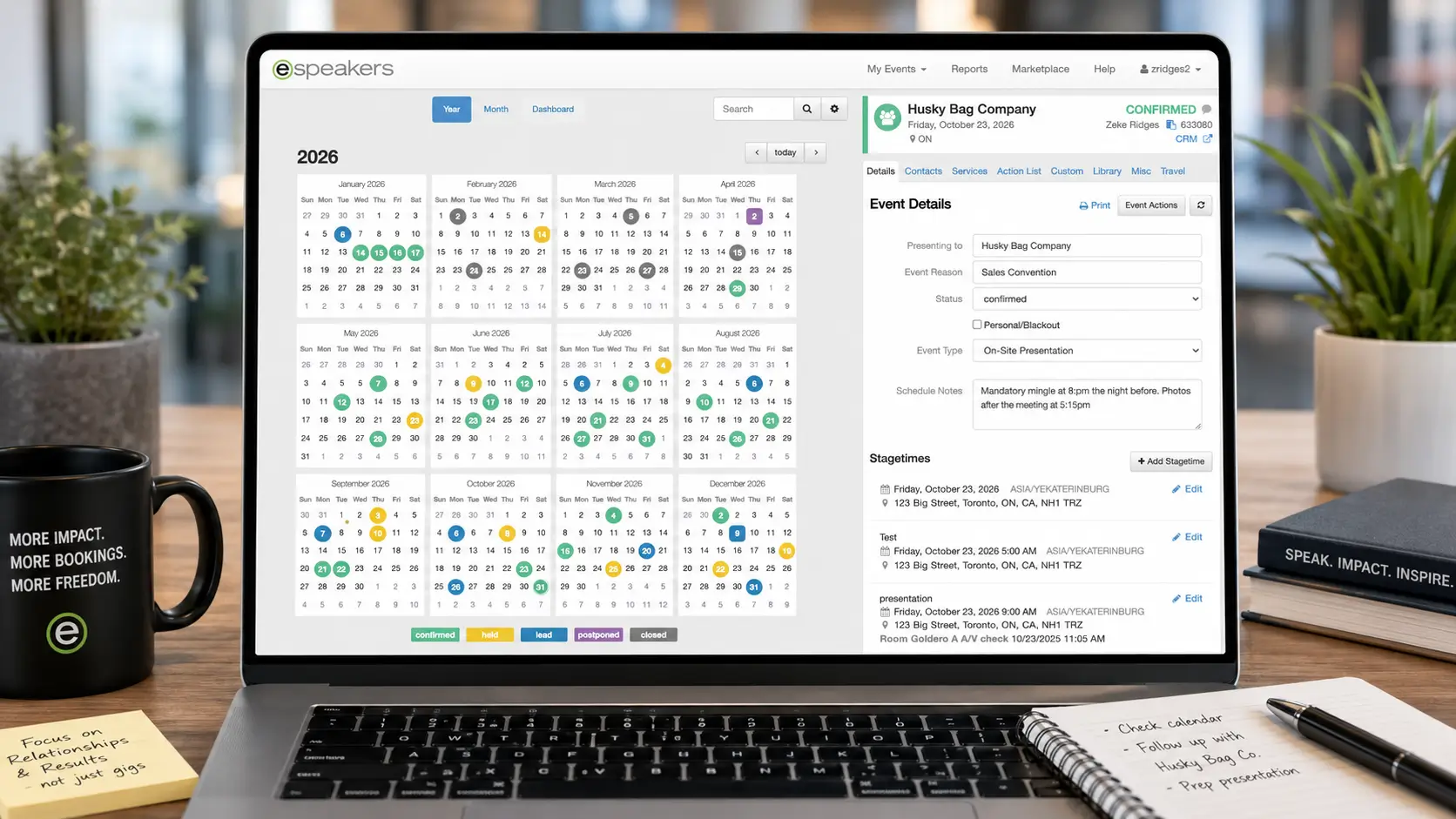
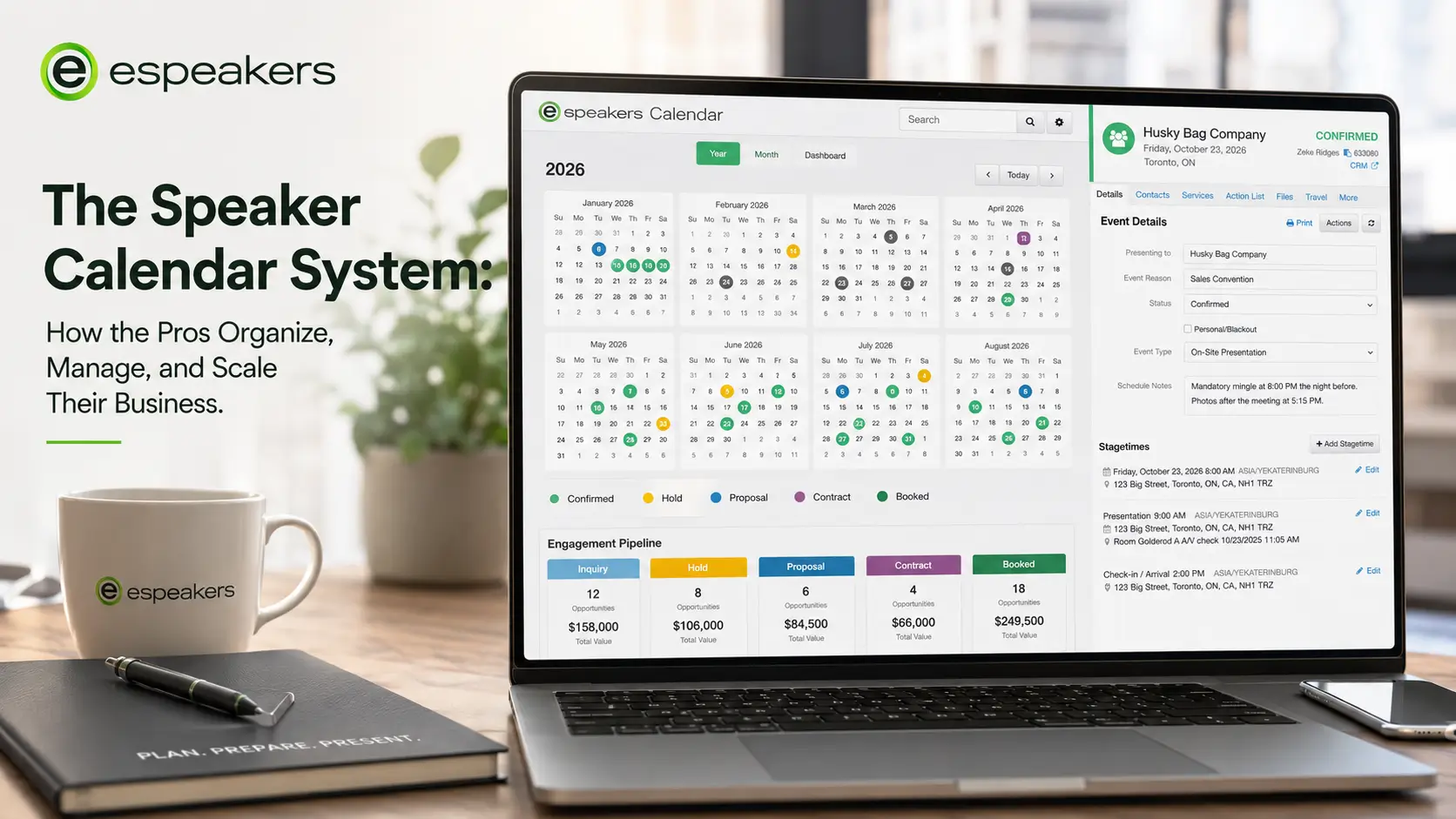
eSpeakers' built-in calendar tool was designed specifically for this use case. Unlike generic scheduling tools, it understands the lifecycle of a speaking engagement, holds, confirms, travel blocks, and availability windows, and keeps your public directory profile in sync without manual intervention. When paired with HighLevel CRM, it provides complete pipeline visibility, allowing speakers to see their business at a glance instead of piecing it together from multiple apps.
The Scaling Inflection Point: When to Add Support
At some volume of engagements, managing a speaking calendar solo becomes the bottleneck on growth. The question isn’t whether you’ll need support; it’s recognizing when you’ve crossed the line where admin is costing you bookings.
The signals are usually clear in retrospect and subtle in the moment:
- You’re delaying follow-ups on new inquiries because you’re traveling
- Prep calls are being scheduled at the last minute because you didn’t plan them into your calendar far enough in advance
- You’re discovering holds that expired without your noticing
- Post-event testimonial and follow-up tasks are happening weeks late or not at all
- You’re turning down discovery calls with new leads because you don’t have bandwidth
If three or more of these are true, you need a system upgrade before you need a VA, because a VA working without a system will just introduce new chaos at scale. The right order is: lock down the system (calendar software, CRM pipeline, templated workflows), then add the human capacity to run it.
For most speakers operating above 30–40 engagements per year, a part-time virtual assistant with clear system access can handle the majority of calendar management, hold acknowledgments, contract dispatch, and post-event sequences, freeing the speaker to focus on content, marketing, and business development.
The Speaker Calendar Audit: Where Are You Leaking Revenue?
Run your current calendar setup against these questions. Every “no” is a system gap that’s probably costing you bookings or adding unnecessary friction.
Availability visibility
- Can a meeting planner see my current availability without emailing me first?
- Is my eSpeakers calendar synced to my master operations calendar in real time?
- Does my calendar accurately reflect travel days around confirmed engagements?
Pipeline management
- Do I have a defined process for logging every inbound inquiry the day it arrives?
- Are all active holds documented with explicit expiration dates?
- Do I have automated follow-ups set for holds approaching their expiration window?
Engagement workflow
- Is there a written checklist for every pre-event task tied to each confirmed booking?
- Does my CRM track the stage of every active engagement?
- Are contract templates ready to send within the same day as a verbal agreement?
Post-event
- Do I send testimonial requests within 48 hours of every engagement?
- Are post-event follow-ups templated and automated where possible?
- Does every completed engagement get logged in my CRM for future reference?
Business intelligence
- Can I tell at a glance how many confirmed engagements I have in the next 90 days?
- Do I know my hold-to-confirm conversion rate?
- Can I identify my strongest and weakest months for booking velocity?
FAQ
General scheduling tools are built for appointment booking; they show availability and let people pick a time slot. They don’t understand the lifecycle of a speaking engagement: holds, travel blocks, multi-week pre-event prep windows, or the difference between a tentative and a confirmed date. eSpeakers’ calendar was built for speakers specifically, which means it handles these nuances natively and keeps your directory profile in sync automatically.
Most event planners book keynote speakers four to six months in advance for standard corporate events, and six to twelve months out for major conferences or high-demand speakers. Having at least 12 months of forward visibility on your public calendar means planners can check availability for events they’re building right now. The further out you can reliably show open dates, the more inbound bookings you’ll capture at the earliest planning stage.
This is one of the most common calendar management dilemmas in speaking. Standard practice: honor existing holds for their stated window. If a new inquiry comes in for a held date before the hold expires, contact the holder immediately to let them know you have a competing interest and ask if they’re in a position to confirm or release. Give them 24–48 hours to respond. Document everything in writing.
Use your eSpeakers Calendar as your main speaking business calendar and commit to it. Everything flows into and out of that one system. If you use Google Calendar, make it the source of truth. Connect your eSpeakers profile to sync from it. Connect your HighLevel CRM to write to it. Consolidation before optimization, a simple, consistent system beats a sophisticated, fragmented one every time.
This is exactly the problem that automated availability display solves. If planners can see your calendar in real time without emailing you, most availability questions answer themselves. For inquiries that require a response, batch your email to two windows per day, once before travel starts and once after landing, and use a CRM autoresponder to acknowledge new inquiries immediately so planners know their message was received.
When your calendar management tasks are consistently taking more than five hours per week, or when you’re missing follow-up windows because you’re traveling. The first tasks to delegate are hold acknowledgments, prep call scheduling, and post-event invoice follow-up, all of which are templatable and don’t require your voice or judgment.
Build the System Once, Let It Work for You
The difference between a speaking business that scales and one that plateaus isn’t talent. It’s infrastructure. The eSpeakers Calendar system, built on the right software, integrated with your CRM, and governed by consistent workflows, turns your calendar from a passive schedule into an active revenue engine.
Every hold acknowledged on time is a booking that didn’t slip. Every pre-event checklist completed without chasing is a planner who rebooks. Every post-event follow-up sent within 48 hours is a testimonial that builds the next inquiry.
None of it is complicated. All of it compounds.
Start your 60-day eSpeakers PRO free trial →
Get a speaker calendar built for the engagement lifecycle, with real-time availability display on your profile, automated syncing, and native HighLevel CRM integration so your pipeline and your calendar are always telling the same story.
Joe Heaps, Chief Marketing Officer at eSpeakers
Joe Heaps is the Chief Marketing Officer at eSpeakers and is responsible for creating and accelerating the company's sales & marketing strategies. He is focused on driving the company's vision of helping organizations and individuals improve in substantial, long-term ways. He believes it happens when the perfect speaker is in front of the right audience. Over 25 years in the industry, Joe’s strategic vision and leadership have propelled eSpeakers to the leading software platform for speakers, coaches, and experts.
Joe Heaps
Chief Marketing Officer, eSpeakers
Latest Articles